
A standard operating procedure (SOP) lays out what your team needs to write down about a process: who does it, in what order, and how to tell it's done.
Our SOP template covers 15 essential fields and tells you what to write in each. We've also added 64 examples of SOPs for specific teams and industries: 16 templates you can copy, including a month-end close checklist and an incident response runbook, plus 48 published SOPs to compare them with.
The Word / Google Docs / PDF file includes the blank template plus a filled out example. The 16 templates are also in a separate file (Word / PDF).
Jump to your team or industry: Healthcare · IT incidents · Manufacturing · Restaurant · Aviation · Software · Accounting · Operations · HR · Laboratory · Customer support · Finance · IT backups · Warehouse · Supply chain · Mission control
Also on this page: Filled example · Examples by task · SOP formats · Write your own · Use it with AI · FAQ
Simple SOP Template
Use this one-page SOP template to document any process that doesn't require a specific format. Get it as a Google Doc, a Word file, or a PDF.
SOP-<ID>: <Title>
| Field | What to write |
|---|---|
| Version | <1.0>, effective <date> |
| Owner | <role> |
| Next review | <date> |
| Last tested by | <name, date> |
| Purpose | Prevents <the failure this SOP exists to stop>. |
| Scope | Covers <who, where, and which systems>. Doesn't cover <what's left out>. |
| Trigger | Start when <event>. Don't start if <condition>. |
| Done when | <observable end state>. |
| Format | <checklist, runbook, work instruction, step-by-step, decision table, handoff, or if-then rules> |
| Roles | <who does it> · <who checks> · <who can stop the work> |
| Before you start | <access, tools, inputs, time needed> |
Steps
| # | Step | Check | Why |
|---|---|---|---|
| 1 | <Verb> <object>. | <what you'll see if it worked> | <reason, for any step people are tempted to skip> |
| 2 | WARNING: <hazard>. <Verb> <object>. | <...> | <...> |
If it goes wrong
| If | Then |
|---|---|
| <check fails, recoverable> | <fix>, then repeat the check. |
| <check fails, not recoverable> | Stop, <safe state>, tell <role>. |
| Never alone | <steps that need a second person or a second channel> |
Records: <what to log, where, how long to keep it>
Change log
| Version | Date | What changed | Why |
|---|---|---|---|
| <1.0> | <date> | <what changed> | <why, e.g. incident link> |
Be specific when filling out below three fields (they're easy to leave vague):
- Trigger: When should someone start the task?
- Done when: How do they know the task is complete?
- If it goes wrong: What should they do if a check fails?
Filled SOP Example: Employee Onboarding
Here's what the template looks like when filled out for employee onboarding. You'll find this example in both the Google Doc and the Word file.
SOP-HR-001: Employee Onboarding
| Field | Example |
|---|---|
| Version | 1.2, effective January 5, 2027 |
| Owner | People operations lead |
| Next review | July 5, 2027 |
| Last tested by | A sales manager who didn't write it, December 14, 2026 |
| Purpose | Prevents a new hire from starting without accounts, equipment, or a first-week plan. |
| Scope | Covers every new full-time employee, in any department. Doesn't cover contractors or offboarding. |
| Trigger | Start when the offer is signed and the start date is set. Don't start on a verbal yes. |
| Done when | The new hire has signed in to every system on their access list, IT has closed their test ticket, and the manager has logged the day-30 check-in. |
| Format | Step-by-step |
| Roles | People ops runs it · the hiring manager checks it · IT can hold access until the laptop is enrolled |
| Before you start | Signed offer, start date, job title, manager's name, and the access list for the role |
Steps
| # | Step | Check | Why |
|---|---|---|---|
| 1 | People ops opens the onboarding checklist 5 business days before the start date. | Every task has an owner and a due date. | A task with no owner gets skipped. |
| 2 | IT creates the accounts on the role's access list and ships the laptop. | Every account on the list exists, and the courier shows the laptop as delivered. | The new hire can work on day 1. |
| 3 | The hiring manager assigns a buddy and books the first-week meetings. | The buddy and the meetings are on the new hire's calendar. | The new hire knows who to ask. |
| 4 | On day 1, the new hire signs in to every system on the access list. | The new hire opens a test ticket with IT from their own account, and IT closes it. | A closed ticket proves that email, sign-in, and the help desk all work. |
| 5 | In week 1, the new hire finishes security training and signs the policies. | The training system shows both as complete. | Customer data access depends on both. |
| 6 | On day 15, people ops reviews the checklist. | Every task is done, marked as not needed, or has a new date. | There's still time to fix a missed task. |
| 7 | On day 30, the hiring manager holds a check-in and closes the checklist. | The check-in notes are saved, and the checklist is closed. | The process ends on a date, with a sign-off. |
If it goes wrong
| If | Then |
|---|---|
| A sign-in fails on day 1 | The ticket stays assigned to IT until the new hire confirms sign-in works. |
| The laptop hasn't arrived by day 1 | IT issues a loaner the same day. |
| The checklist is still open after day 30 | People ops takes the open tasks to the department head. |
| Never alone | Admin rights and access to payroll or production need the system owner's approval as well as the manager's. |
Records: The closed checklist, saved in the employee's HR file for as long as the file is kept
Change log
| Version | Date | What changed | Why |
|---|---|---|---|
| 1.2 | January 5, 2027 | Added the day-1 test ticket | A new hire went a week without help desk access |
Notice how the Done when line defines what successful onboarding looks like. Instead of simply saying onboarding is complete, it lists three things you can objectively verify: successful sign-ins, a closed test ticket, a recorded check-in.
The test ticket is particularly useful. IT sets up the accounts, but the new hire verifies that they work by raising a ticket from their own account. If they have trouble signing in, IT remains responsible for the ticket until the new hire confirms that the issue is resolved.
We've also covered GitLab's actual onboarding SOP as example 9 below.
64 SOP Examples by Task
Each of the 16 entries below is a template you can copy, followed by three published SOPs to compare it with. All 16 templates also come in a file (Word / PDF).
| If you need to | Start with |
|---|---|
| Pause a team before a step it can't undo | 1. Surgical Safety Checklist |
| Run a production incident | 2. Incident Response Runbook |
| Teach a hands-on job | 3. Work Instruction |
| Keep food inside a temperature limit | 4. Food Safety Procedure |
| Run a critical routine against the clock | 5. Cockpit Checklist |
| Ship a release to production | 6. Deployment Runbook |
| Close the books each month | 7. Month-End Close Checklist |
| Hand work to the next shift | 8. Shift Handover |
| Onboard or offboard an employee | 9. Onboarding and Offboarding Checklist |
| Document a method | 10. Technical Procedure |
| Triage support tickets | 11. Ticket Triage Table |
| Approve vendor payments | 12. Vendor Payment Controls |
| Back up and restore services | 13. Backup and Restore Runbook |
| Count inventory | 14. Cycle Count Procedure |
| Approve a supplier | 15. Supplier Approval Table |
| Decide in advance what to do in an emergency | 16. If-Then Flight Rules |
SOP Format: Seven Layouts and When to Use Each
The basic template uses simple numbered steps, but some procedures are easier to follow in other formats. Below are seven formats to choose from, depending on who will use the SOP and how much time they have to read it.
| Format | Use it when | Examples |
|---|---|---|
| Checklist | People who know the work have to confirm a few items that can't be missed. | Surgical Safety Checklist, Cockpit Checklist, Month-End Close Checklist, Onboarding and Offboarding Checklist |
| Runbook | Something has broken, or a risky operation is about to run, and the order of steps matters. | Incident Response Runbook, Deployment Runbook, Backup and Restore Runbook |
| Work instruction | A new person is learning a hands-on job. | Work Instruction |
| Step-by-step | The work has to go the same way every time, with a check or a limit at the steps that matter. | Food Safety Procedure, Technical Procedure, Cycle Count Procedure |
| Decision table | The right action depends on a few facts about the case. | Ticket Triage Table, Vendor Payment Controls, Supplier Approval Table |
| Handoff | The work keeps running while the people change. | Shift Handover |
| If-then rules | A rare emergency leaves no time to think, so the decision is made in advance. | If-Then Flight Rules |
1. Healthcare SOP Template: Surgical Safety Checklist
Checklist · Adapted from the WHO Surgical Safety Checklist
Use this format when experts already know the procedure by heart, but still need to pause at specific points to check that nothing critical has been missed.
Checklist: <procedure>
Read aloud by: <role>
Pause 1 · Before <the first step you can't undo>
- <Identity or target> confirmed against <source of truth>
- <Known risk> checked, and the plan for it said out loud
- <Equipment or input> ready and tested
Pause 2 · Before <the point of no return>
- Everyone states their name and role
- <Target> confirmed again by the person doing the work
- <Time-sensitive step> done within <limit>
Pause 3 · Before <handoff or leaving>
- <Counts or reconciliation> complete
- <Labels and records> correct
- Concerns for the next person stated
Stop rule: Work doesn't continue until every box at the pause is checked.
In such cases, it's best to start by looking for points in your workflow where a mistake would be difficult or impossible to fix later.
- What are the three most important things to check before moving on at each milestone?
- Who runs through the checklist?
- Who has the authority to stop the work if something is wrong?
The World Health Organization's Surgical Safety Checklist is an excellent example. It contains 19 items divided across stages of a surgery (before anesthesia, before the first incision, and so on), and the surgical team needs to confirm each item out loud.
In fact, A study compared outcomes for 3,733 patients before its introduction and 3,955 patients afterward. The death rate fell from 1.5% to 0.8%, and the complication rate fell from 11% to 7%. Even though the checklist tells a surgeon nothing about how to perform surgery better, it's still useful to make sure that critical steps aren't overlooked.
You can read the original 2009 study in the New England Journal of Medicine. The checklist and its implementation manual are available on WHO's Safe Surgery page.
Real SOPs to compare:
- The Joint Commission's Universal Protocol: the three steps accredited hospitals follow before a procedure, ending with a time-out.
- WHO's Safe Childbirth Checklist: the same checklist idea applied to childbirth, with a 2015 guide to putting it into practice.
- Stanford Medicine's Emergency Manual: free checklists for 25 critical events in the operating room.
2. IT SOP Template: Incident Response Runbook
Runbook · Adapted from Google's SRE book and PagerDuty's incident response guide
Use this when something breaks in prod and multiple people need to work together to fix it.
Runbook: Incident response for <service>
Owner: <on-call lead>
Declare an incident if any of these is true
- Another team is needed to fix it
- Customers can see it
- It's still unsolved after 1 hour of focused debugging
| Severity | Definition, with numbers like % of users affected |
|---|---|
| SEV-1 | <...> |
| SEV-2 | <...> |
| SEV-3 | <...> |
Unsure? Pick the higher one.
- Page the incident commander (IC). The IC names a scribe and an ops lead.
- Open <channel> and the incident doc. Top of the doc: impact, status, next update.
- Only the ops lead changes production. Everyone else proposes; the IC decides.
- Work in this order: stop the damage, restore service, keep the evidence. Recent deploy? Roll it back first.
- Post an update every <30> minutes, even if nothing changed.
- Handing over? Brief the next IC and wait for "I have command."
- Close it: announce the end and schedule the postmortem.
Start by defining your severity levels using specific thresholds.
- How many users need to be affected for an incident to qualify as SEV-1?
- Who can make changes to production during an incident?
- Who decides when the incident is resolved?
Two more things we'd advice incorporating -
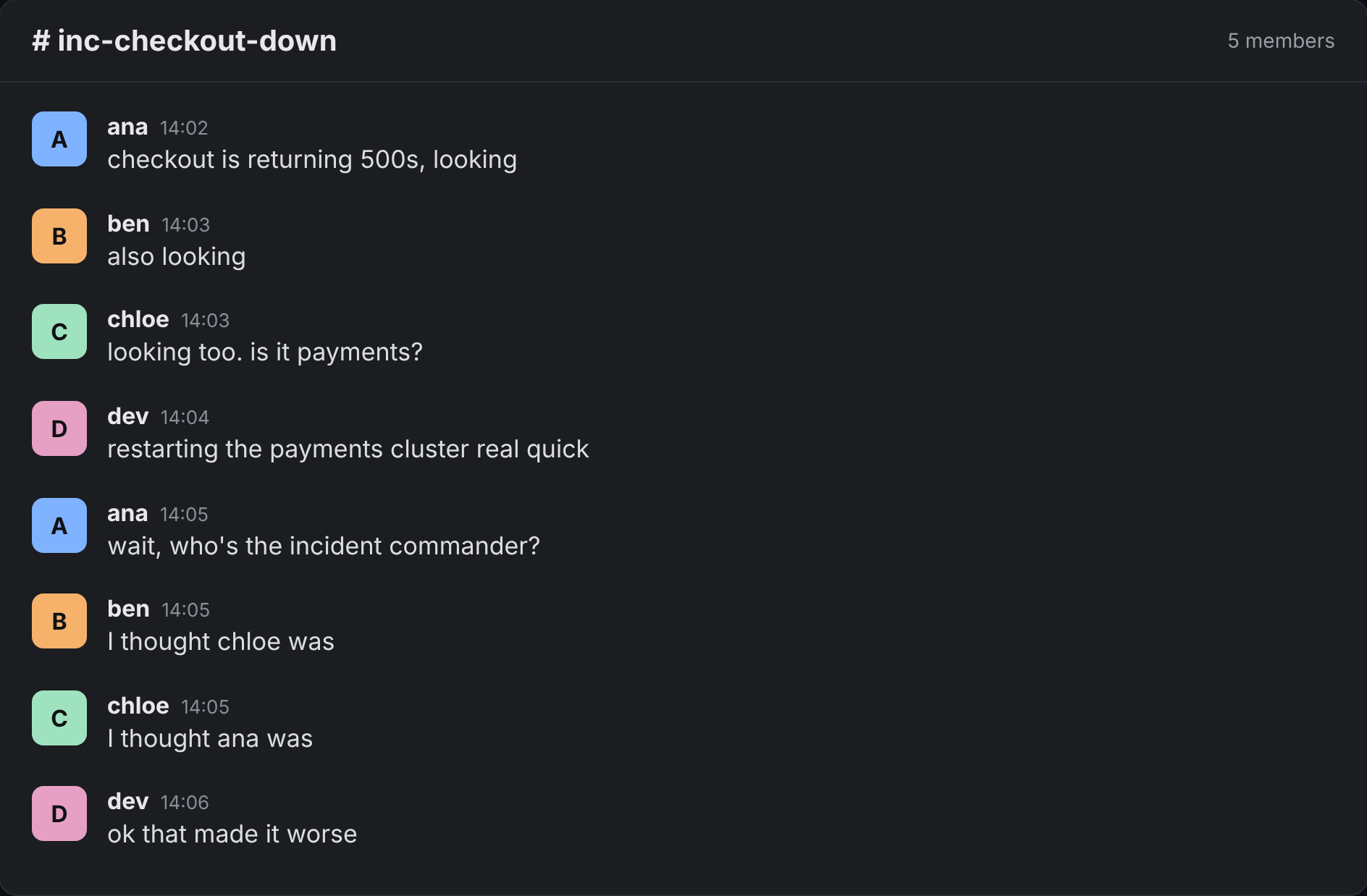
- This one's from Google's SRE book. Mary, an on-call engineer, watches as her service's datacenters fail one after another. Several engineers jump in to help, but no one is coordinating their efforts. One engineer pushes an untested change and ends up taking the servers down entirely. The book then walks through the same incident again, but this time Mary puts a colleague in charge of managing the incident. That colleague maintains a running document of what's happening and keeps the relevant people informed.
- PagerDuty's incident response guide offers a few practical rules worth adopting. Every SEV-1 and SEV-2 incident needs an incident commander. And if you're unsure which of two severity levels applies, go with the higher one.
Read Andrew Stribblehill's Managing Incidents chapter in Google's SRE book, then PagerDuty's severity levels and the During an Incident page next to it.
Real SOPs to compare:
- Atlassian's incident management handbook: how Atlassian detects, responds to, and learns from incidents, and what its incident manager does.
- GitLab's incident management process: the incident lead, responder, and communications lead roles, plus S1 to S4 severity levels.
- The UK Ministry of Justice's incident process: a short Cloud Platform runbook that goes from declaring an incident to the review afterward.
3. Manufacturing SOP Template: Work Instruction
Work instruction · Adapted from the TWI job breakdown sheet
Use this when a new person needs to do a hands-on job the way your best person does it.
Work instruction: <task>
Station: <...> · Version: <n>
Parts, tools and materials: <...>
| # | Important step (what) | Key points (how) | Reasons (why) |
|---|---|---|---|
| 1 | <Verb> <object> | <make-or-break detail> | <what goes wrong otherwise> |
| 2 | <Verb> <object> | <safety point> | <injury it prevents> |
| 3 | <Verb> <object> | <knack that makes it easier> | <time or effort it saves> |
To teach it: Prepare the learner, show one step at a time, watch them do it while they explain the key points, then check back on their work later.
Watch an experienced employee do the job. Write down the steps that move the work forward, leaving out unnecessary details. At each step, ask them what a new employee is likely to get wrong, how to get it right, and why it matters.
During World War II, the US Training Within Industry (TWI) program taught supervisors how to train workers who had little or no experience. Its Job Instruction method used a simple sheet called a job breakdown, with three columns:
- Important steps: What needs to be done.
- Key points: What someone needs to know to do it right.
- Reasons: Why each key point matters.
TWI defines a key point as anything that can make or break the job, affect the worker's safety, or make the work easier.
While most SOPs like these leave out the reasons, knowing why a step is done a certain way helps employees make better decisions when they encounter a situation the SOP doesn't cover, and it also instills confidence and credibility in the SOP itself.
The Lean Enterprise Institute has a short introduction to TWI and a set of printable training cards that explain how to break down a job.
Real SOPs to compare:
- UC Berkeley's engine lathe job safety analysis: each lathe task listed with its hazards and the controls for each one.
- UC Santa Barbara's metal lathe procedure: checklists for before, during, and after using the lathe, plus the protective gear.
- Prusa's MK4S kit assembly manual: the official eight-chapter guide to building Prusa's 3D printer kit.
4. Restaurant SOP Template: Food Safety Procedure
Step-by-step · Adapted from the Institute of Child Nutrition's cooling SOP
Use this format when a task has a measurable desired limit and the SOP needs to explain what to do when a value falls outside that limit.
SOP: <task>
Implemented: <date> by <name> · Reviewed: <date> · Revised: <date>
Purpose: Prevent <hazard>.
Scope: <who does this, and where>.
Instructions
- <Step>
- <Step with a limit: "from X to Y within Z">
Monitoring: <what to measure, with which tool, how often>.
Corrective action
- Missed but recoverable (<condition>): <fix>, then measure again.
- Missed and not recoverable (<condition>): <discard, stop or quarantine>.
- Anyone who skipped the SOP is retrained.
Verification and records: <log name>. <Role> reviews and initials it every <period>. On days the task isn't done, the log says so. Keep records for <N> months.
Start with defining the exact threshold.
- Past what limit is the work unsafe or unusable?
- How often will someone check it?
- What do they do when it's a little off versus a lot off?
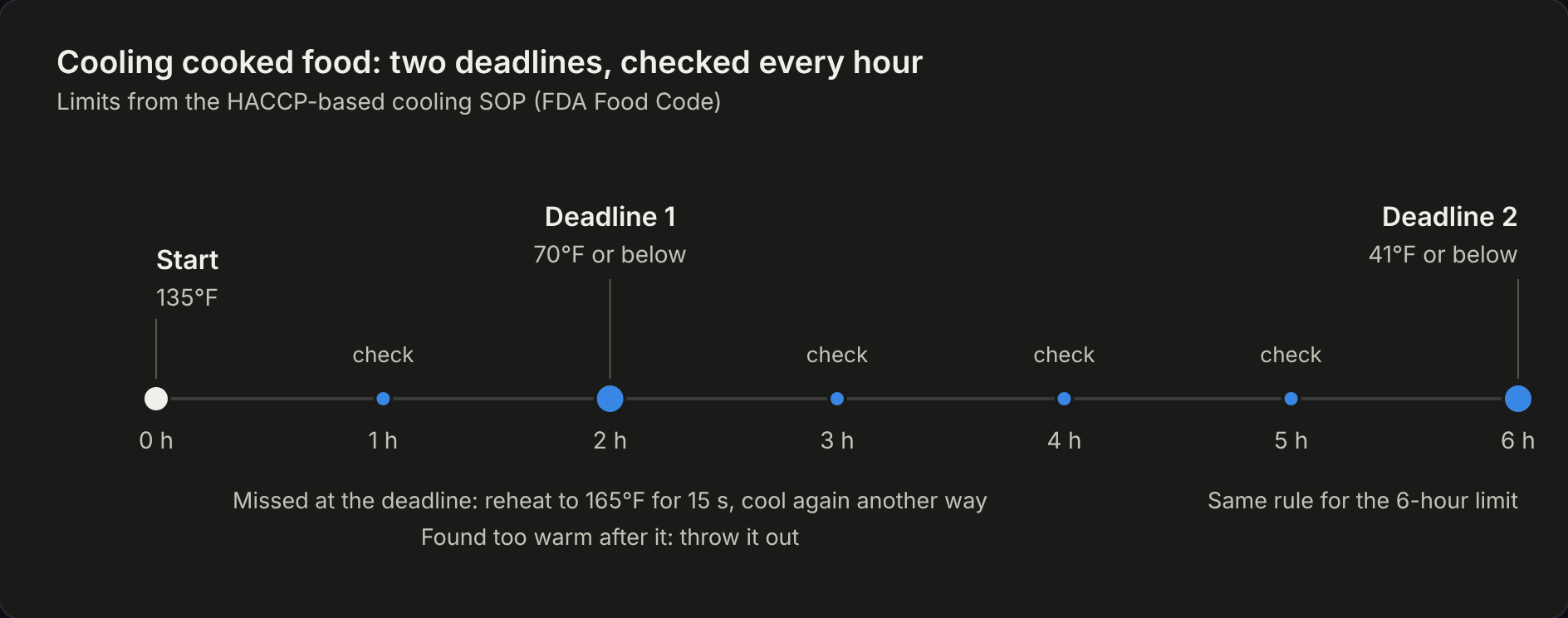
The Institute of Child Nutrition publishes a set of food safety SOPs for school kitchens. Its SOP for cooling food is pretty good example. It covers the purpose, scope, instructions, monitoring, corrective action, verification, and record keeping.
Something this SOP does really well is it has clear instructions for when things don't go as planned. If the food is still above 70°F before the two-hour mark, staff must reheat it to 165°F for 15 seconds and try a different cooling method. If the food has exceeded the allowed time limit, they must throw it out.
You can refer to the full set from the Institute of Child Nutrition. The SOPs are written for school kitchens that follow the FDA Food Code.
Sample SOPs to compare:
- Northern Nevada Public Health's sample cooling SOP: the same two cooling deadlines, the reheat to 165°F, and logs kept for six months.
- The Virginia Department of Health's sample cooling policy: names the pans, the ice bath, and how often to check, and has the kitchen manager review the logs daily.
- Marin County's cooling SOP form: a fill-in form where a kitchen lists its foods, cooling methods, staff, checks, and fixes.
5. Aviation SOP Template: Cockpit Checklist
Checklist · Our response to two documented accidents
Use this for time-sensitive critical procedures. For example, when one person needs to read each checklist item aloud and the other confirms it.
Checklist: <phase>
Method: challenge and response
Used when: <situation> · Time available: <seconds or minutes>
Reader: <role> · Responder: <role, who looks before answering>
| Challenge | Response |
|---|---|
| <Item 1> | "<state>, checked" |
| <Item 2> | "<value>" |
| <Killer item> (the one that ends the day if missed) | "<state>" |
Out: If <condition>, stop here and switch to <shorter checklist or procedure>.
Start with defining how much time you'll when you use the SOP.
- Could someone finish this list under stress in that time?
- If you could keep only one item, which would it be, and is it near the top?
On October 30, 1935, Boeing's Model 299 crashed shortly after takeoff. Investigators found that the elevator controls were still locked. Following the crash, Air Corps personnel developed separate checklists for takeoff, flight, before landing, after landing.
But turns out having a general checklist in these situations isn't enough. In 2009, US Airways Flight 1549 lost both engines after striking a flock of geese. The crew had roughly three minutes before landing on the Hudson. The Engine Dual Failure checklist was written for engine failures above 20,000 feet, so the crew could complete only nine of the 15 steps.
The NTSB concluded that the crew would have been more likely to complete a checklist designed specifically for engine failures at low altitudes.
Here's the original checklist.
Read Walter Boyne's account of the Model 299 crash, then the FAA's lessons learned page on Flight 1549. It explains what the checklist asked the crew to do and why it didn't fit.
Real SOPs to compare:
- The University of Oklahoma's Cessna 152 checklist: the aviation school's normal and emergency checklists, with one item and one action per line.
- The University of Dubuque's Cessna 172 SOP: a flight school SOP with a table of what the pilots call out, and when.
- The 303rd Bomb Group's B-17 checklist: the cockpit checklist from the Army Air Forces' 1944 training manual, read aloud by the copilot.
6. Software SOP Template: Deployment Runbook
Runbook · Our response to the Knight Capital failure
Use this on projects where the cost of a bad release outweighs the time spent checking it.
Runbook: Production deploy of <service>
| Field | What to write |
|---|---|
| Covers | Code, config, and flag changes to <service>. A flag flip is a deploy. |
| Release | <commit SHA>, built once by CI as <image digest>. Diff: <link> |
| People | <name> deploys. <name>, who didn't write the change, checks. |
| Window | <weekdays, 10:00 to 15:00>. Not during <a freeze, an incident, or peak traffic>. |
| Rollback | <exact command> redeploys <previous SHA>. Takes <N> minutes. |
| Kill switch | <exact command> takes <service> offline. Either person can run it without asking. |
Preflight
- CI is green on
<SHA>, and staging has run this exact artifact for <24 hours>. - The second person has read the diff and this runbook.
- Flags: any flag this release adds has a new name. No retired flag or config key is reused.
- Compatibility: the previous release works with everything this one changes (schema, config, message formats, flags). If it doesn't, split the release.
- Rollback rehearsed in staging: deploy, roll back, deploy again.
- Alerts for <service> page <on-call rotation>. Nothing that matters goes only to a mailbox.
Rollout
| Stage | Scope | Bake | Go on only if |
|---|---|---|---|
| 1 | <1 host, or 1% of traffic> | <15 min and 100 requests> | The version check passes. <Error rate> and <p99 latency> on new hosts are within <X%> of old hosts. |
| 2 | <25%> | <30 min> | Same checks. |
| 3 | <100%> | <60 min> | Same checks, and <business metric> is steady. |
Version check, after every stage
Run <command that prints the build on every host>. Pass means <n> of <n> hosts report <SHA> and none report anything else. The second person reads the output, not the tool's "success" message.
Stop
| If | Then |
|---|---|
| A host reports a different build | Stop. Keep traffic off that host. Fix it or roll back the stage. |
| A check fails, or something shows up that you can't explain in <5> minutes | Roll back now. Debug later, on the previous release. |
| Rollback doesn't restore <metric> in <N> minutes | Use the kill switch. Declare an incident: <link to the incident runbook>. |
After
- Post
<SHA>, start and end times, and anything odd in <channel>. - Open a ticket to delete this release's flags and old code paths by <date>.
Start by writing down how you prove a release reached every host.
- Which command prints the build each host is running?
- Is the result a count you read, or a green "success" message you trust?
- Who reads it besides the person deploying?
On hosts you reach over SSH, the check is a short loop:
for h in $(cat hosts.txt); do
  ssh "$h" cat /srv/app/BUILD
done | sort | uniq -c
A healthy fleet prints one line, like 8 4c1f9e2. Two lines mean two builds are live. Kubernetes documents a one-liner that lists running images and counts them the same way.
This runbook isn't Knight Capital's procedure. It's our response to a failure the SEC documented. On August 1, 2012, Knight's order router turned 212 small retail orders into more than 4 million executions in about 45 minutes, and the firm lost over $460 million.
Five things went wrong with the deploy, and the template has a line for each.
- A reused flag. The release repurposed a flag that once switched on a feature called Power Peg. Knight stopped using Power Peg in 2003 but left the code on its production servers.
- Dead code nobody retested. In 2005, Knight moved the counter that told Power Peg when an order was filled, and didn't retest Power Peg. In 2012, the old code kept sending orders no matter how many had filled.
- Two builds in production. The rollout started on July 27. A technician didn't copy the new code to one of the eight servers, and no second person reviewed the deploy. Seven servers read the flag as the new feature. The eighth read it as Power Peg.
- Alerts sent by email. Before the market opened, an internal system sent 97 emails reporting "Power Peg disabled." They went to a group of staff and weren't designed as alerts.
- A rollback that spread the fault. Knight uninstalled the new code from the seven good servers while flagged orders kept arriving, so those servers ran Power Peg too. The SEC said staff needed clear guidance on when to disconnect a malfunctioning system.

A flag flip counts as a deploy in the template for a reason. When Google sorted thousands of its postmortems from 2010 to 2017 by trigger, binary pushes came first at 37% and configuration pushes second at 31%.
For the blanks in the rollout table, borrow from teams that deploy all day. At AWS, each wave of a typical pipeline starts with one box that takes at most 10% of a region's requests. The pipeline waits at least an hour before going wider. At Google, a team that suspects a bad release rolls back first and investigates second.
Read the SEC's order against Knight Capital, paragraphs 12 to 19 and 27. Clare Liguori's Automating safe, hands-off deployments shows how AWS pipelines enforce these gates with no one watching. Sandeep Pokkunuri's Ensuring rollback safety during deployments covers how to test a rollback before you need it.
Real SOPs to compare:
- GitLab's deployment process: canary first, a 30-minute bake before promotion, a weekend change lock, and rules on who can roll back.
- Wikimedia's train deploys: a weekly release that reaches every wiki in three groups over three days, with a clear rule for when to roll back.
- GOV.UK's deployment process: integration, then staging, then production, with smoke tests gating each step and set hours for deploying.
7. Accounting SOP Template: Month-End Close Checklist
Checklist · Adapted from the close rules in GitLab's handbook
Use this for tasks due on the same working days each month.
Month-end close: <entity>, <period>
Owner: <controller>
WD1 is the first business day after month-end. Similarly, WD-1 is the last business day before month-end.
| WD | Task | Done when | Preparer | Reviewer |
|---|---|---|---|---|
| -1 | Collect accrual support for expenses over <$5K> | <...> | <...> | <...> |
| 1 | Close AP and AR subledgers. Cutoff rule: <...> | <...> | <...> | <...> |
| 2 | Reconcile bank and cash accounts | <...> | <...> | <...> |
| 3 | Post accruals, prepaids, and payroll entries | <...> | <...> | <...> |
| 4 | Reconcile every balance sheet account | <...> | <...> | <...> |
| 5 | Flux review: explain changes over <10% or $X> | <...> | <...> | <...> |
| 6 | Controller signs off. Lock the period. | <...> | <...> | <...> |
Rules
- The reviewer is never the preparer.
- Every account has a risk rating. High-risk accounts get a second reviewer.
- A reconciliation ties the ledger to something the preparer didn't produce: a bank statement, a vendor invoice, a report the reviewer pulls.
- Manual journal entries over <$X> need support attached and a reviewer.
- Accruals reverse next month and get compared with the invoices that arrive.
- The next period doesn't open until every reconciliation is signed.
Our month-end close checklist is a much better example, it has core tasks with a deadline and a done-when test for each, plus versions for ten kinds of business. If you are looking for a month-end close checklist, we highly recommend checking it out.
To explore further, you can read GitLab's policies in this handbook. They keep their full close checklist internal, so you'll see the rules but not every step.
Real SOPs to compare:
- Western Carolina University's month-end close checklist: the June 2026 close, with every task sorted by the working day it's due.
- Rutgers' FY27 closing calendar: the controller's deadlines for each month, from the AP ledger close on day 3 to the controller's close on day 12.
- The University of Missouri System's month-end procedure: a control list that each person initials, signed off by an independent reviewer.
8. Operations SOP Template: Shift Handover
Handoff · Our response to the Texas City refinery findings
Use this when one team picks up where another left off. This can happen on a factory floor, during an on-call rotation, or in a support team working across time zones.
Handover: <unit, queue, or system>
From: <name> · To: <name> · When: <date, time>
Face to face or on a call, with the log open. Both people sign.
- Right now: what's unstable, urgent, or outside normal limits
- What changed: work done this shift, in order, naming each system touched
- In progress: jobs half done, open permits or tickets, who's waiting on what
- Next actions: what the next shift has to do, and by when
- If it goes wrong: what to watch for, and what to do first
- Read-back: the receiver repeats the plan in their own words and asks questions
Rules
- The outgoing person writes the log before the conversation, in full sentences.
- No shorthand the next shift could read two ways. Name the equipment.
- The outgoing person stays until the receiver says "I have it."
- Leaving early or arriving late? Do the handover by phone, then log it.
To start, think back to the last time you walked into a shift and things went wrong.
- What did you wish the previous shift had told you?
- Could a single line in the shift log have made a difference?
Start crafting your SOP from there.
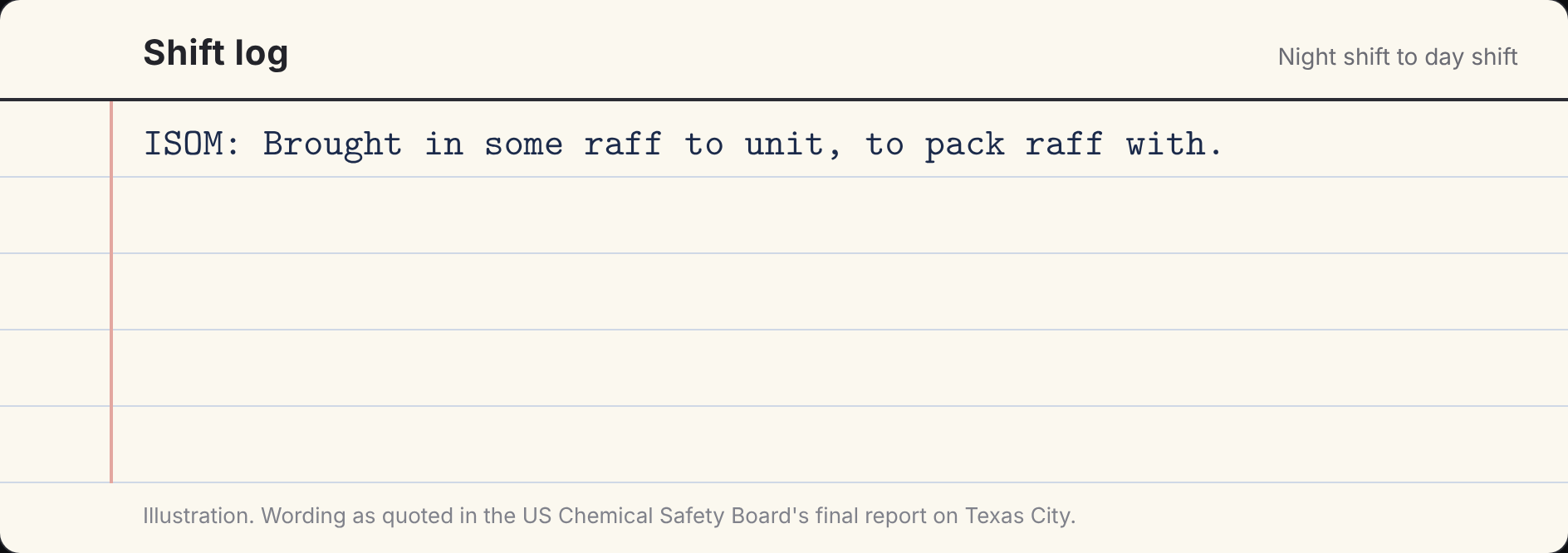
On March 23, 2005, an explosion at BP’s Texas City refinery killed 15 people and injured 180. When the US Chemical Safety Board investigated, it found problems with that morning’s shift handover. It failed to mention that the heat exchangers and piping had also been filled.
The benefits of a good handover are particularly well documented in healthcare. In a 2014 study across nine hospitals, residents were trained to follow a structured handover process called I-PASS. One of its steps was "the person receiving the handover had to repeat back what they understood". Medical errors fell by 23% after the program was introduced.
Read Amy Starmer and colleagues' I-PASS study. The study is strong evidence for hospitals and a good hint for everyone in general. The UK safety regulator's page on shift handover covers the major points for industrial handovers.
Real SOPs to compare:
- NSW Health's clinical handover policy: mandatory across NSW Health, with a named leader, face-to-face handover where possible, and a clear point when responsibility passes.
- DOE's guide to operations turnover: log reviews, joint walkdowns, and an off-going operator who stays until the relief signs. Appendix A has a sample checklist.
- GitLab's on-call handover: a handover issue for every shift, assigned to the incoming engineer, with a required end-of-shift summary.
9. HR SOP Template: Onboarding and Offboarding Checklist
Checklist · Adapted from GitLab's onboarding flow
Use this for both onboarding, offboarding, or any other similar activities.
Onboarding: <name>, <role>
Opened by: <people ops>, <N> days before start
Built from: base list + <country> + <department> + <role> files
Each task ends as "Done" or "Checked, doesn't apply to me."
Before day 1 (manager, IT)
- Accounts for <role> requested from the access baseline
- Laptop shipped, buddy assigned
Day 1 (new hire)
- Signed in to every system on the access list
- Test ticket opened with IT, and closed
Weeks 1 to 4 (new hire, buddy)
- <Required training> finished and <policies> signed
- <First real task> done with the buddy
Day 15: People ops reviews open tasks. Due: start date + <31> days.
Offboarding: <name>
Owner: <IT or security> · Due: last working day
- SSO and email disabled
- Cloud users, API keys and personal access tokens removed in <AWS, GCP, ...>
- Secrets they could read rotated
- Admin roles in third-party tools removed
- One week later: sign-in logs checked for any access since
For a complete onboarding SOP example, see the example earlier in this guide.
Start by thinking about the systems your employees have access to. Which ones can they log into without SSO? Who makes sure a former employee's access has been revoked? Does anyone double-check a week later?
GitLab has a good approach to onboarding. Its People Operations team maintains an issue template for new hires. Employees must confirm that they've completed each task or that it doesn't apply to them. GitLab then runs a compliance check on day 15 and gives employees 31 days to complete their onboarding.
The consequences of getting offboarding can be quite severe. In 2018, a former Cisco employee accessed the AWS infra, several months after resigning. He deleted 456 virtual machines running WebEx Teams, leaving 16k accounts inaccessible for weeks.
If you're writing your own SOP, two resources worth reading are GitLab's onboarding automation flow and the Justice Department's account of the Cisco incident.
Real SOPs to compare:
- PostHog's onboarding process: what the People team, the onboarding buddy, and the team lead each do, from before day one to the end of probation.
- Login.gov's offboarding checklist: every system to remove a departing engineer from, with a shorter list for people who are leaving only for a while.
- Cornell's exit procedures: an exit checklist split between the supervisor, HR, and the employee, from keys and cards to closed accounts.
10. Laboratory SOP Template: Technical Procedure
Step-by-step · Adapted from EPA's guidance for technical SOPs
Use this for processes where multiple people need to follow the same steps and get the same result.
SOP <ID>: <method>
Rev: <n> · Date: <date> · Page: <x> of <y>
Prepared by: <name, date> · Approved by: <name, date>
- Scope and applicability
- Summary of method
- Definitions
- Health and safety warnings
- Cautions (what can damage equipment or samples)
- Interferences (what can throw off the result)
- Personnel qualifications
- Equipment and supplies
- Procedure (numbered steps, active voice, present tense)
- Data and records management
- Quality control (<blanks, duplicates, acceptance limits>)
- References
The US Environmental Protection Agency (EPA) published a guide to writing SOPs in 2007. It covers how to structure a technical SOP pretty well. You can read it here.
Although written for environmental work, it's a useful reference for anyone writing technical SOPs. The appendices also contain complete, worked-out examples rather than just blank templates.
Real SOPs to compare:
- EPA Region 4's field pH procedure: calibration with buffers that bracket the sample, acceptance limits, and a check at the end of the day.
- NIST's SOP 7 for weighing by single substitution: a calibration lab procedure with prerequisites, equations, control charts, and an uncertainty budget.
- CDC's lab procedure for serum cotinine: the method used for the NHANES survey, down to the QC rules for rejecting a run.
11. Customer Support SOP Template: Ticket Triage Table
Decision table · Adapted from GitLab's support impact levels
Use this for teams where tickets pile up and you need a way to decide which ones to handle first.
Triage table: <product> support
Owner: <support lead>
| Level | Impact and example | First reply | Then |
|---|---|---|---|
| 1 Urgent | Down or unusable for everyone. Example: <all users get 502s> | 30 min | Page on-call |
| 2 High | Key feature broken, no workaround. Example: <CI builds failing> | 4 h | Update every <4 h> |
| 3 Normal | Key feature degraded, workaround exists. Example: <known bug> | 8 h | Update daily |
| 4 Low | Question or request, no impact. Example: <how do I enable X?> | 24 h | Normal queue |
Not an emergency: <some users affected>, <one page slow>, <one key failing>.
About to miss a reply target? Send a short reply with the time of your next update.
Escalate to <lead> when: <reply target missed by 1 h>, <customer very unhappy>.
Start by going through last month's support tickets and picking few examples for each row. Then ask two people on your team to classify the same tickets independently. Do they agree on what counts as urgent?
GitLab publishes its support impact levels along with a first-response time for each. An urgent issue, such as every user getting a 502 error, warrants a response within 30 minutes. High-priority issues get 4 hours, normal issues get 8 hours, and low-priority issues get 24 hours.
GitLab distinguishes between similar issues very clearly. If nobody can log in, it's an emergency. If only some users can't log in, it isn't. Examples like these leave less room for interpretation.
GitLab's support impact definitions explain what customers can expect, while its Emergency Exception Workflow explains how the support team handles less clear-cut cases. Both are worth reading when defining your own priority levels.
Real SOPs to compare:
- PostHog's customer support process: engineers answer the tickets, sorted by plan first, with response targets from 72 hours down to 8.
- Boston University IT's priority matrix: impact and urgency set the priority, and each priority has its own assignment and resolution targets.
- Mozilla's bug triage process for Firefox: every component has a triage owner, new bugs are triaged within a week, and S1 bugs are assigned within two business days.
12. Finance SOP Template: Vendor Payment Controls
Decision table · Our response to business email compromise
Use it for requests that change who you pay, how much you pay, or where you send money.
Payment controls: Accounts payable
Owner: <finance lead>
| Request | Verify by | Approvals |
|---|---|---|
| New vendor | Contact details from the signed contract | 2 |
| New bank details | Call the number on file, never one in the request | 2 |
| Urgent payment asked for by an exec | Call them on a number you already have | 2 |
| Known vendor, same details, PO match | Match invoice, PO and receipt | 1 |
Rule: Verify on a channel the requester didn't choose.
After a change: <hold N days or send a small test payment>. Log who verified, how and when.
Paid a fraudster? Call your bank right away to request a recall, then report it at ic3.gov.
Business email compromise (BEC) often starts with an ordinary email. A supplier asks you to update their bank details. An executive asks you to make a wire transfer before the end of the day. In 2025, the FBI's Internet Crime Complaint Center received 24,768 BEC complaints, with reported losses of around $3.05 billion.
The FBI recommends verifying any request to change bank account details through a separate communication channel. It's a simple precaution, but it needs to be part of your payment process rather than something employees are expected to remember.
The FBI's 2025 Internet Crime Report and its 2024 advisory on BEC explain how these attacks work and how to prevent them.
Real SOPs to compare:
- The University of Wisconsin System's procedure for bank detail changes: which ways of checking a change count, which don't, and what to write down.
- The Wyoming State Auditor's banking verification form: staff record the call-back number and where it came from, which can't be the person asking for the change.
- UNC's rules for updating vendor bank accounts: call the vendor's accounting team on an independently sourced number, and never take new bank details by email.
13. IT SOP Template: Backup and Restore Runbook
Runbook · Our response to GitLab's 2017 database outage
Use this for outage responses.
Runbook: Backup and restore for <database>
Owner: <name>, responsible for data durability
Last restore drill: <date>
Backups
- <Tool and version> runs every <interval>. Its version matches the server's.
- Success means a file of at least <size> in <bucket>, not just exit code 0.
- Failures page <rotation>. Test the alert each quarter by breaking a backup on purpose.
Restore drill (every <month>)
- Restore the latest backup to a fresh machine.
- Compare row counts and the newest record's timestamp with production.
- Record how long the restore took and how much data it would have lost.
- Any check fails? Open an incident, not a ticket.
Before any destructive command: Run hostname and read the answer out loud.
Start with a restore, not a backup.
- When did someone last restore your database to a fresh machine?
- How long did it take?
- How many hours of data would you have lost?
In 2017, a GitLab engineer trying to rebuild a lagging replica wiped the data directory on the primary database by mistake. They stopped the command within a second or two, but about 300 GB of data was already gone.
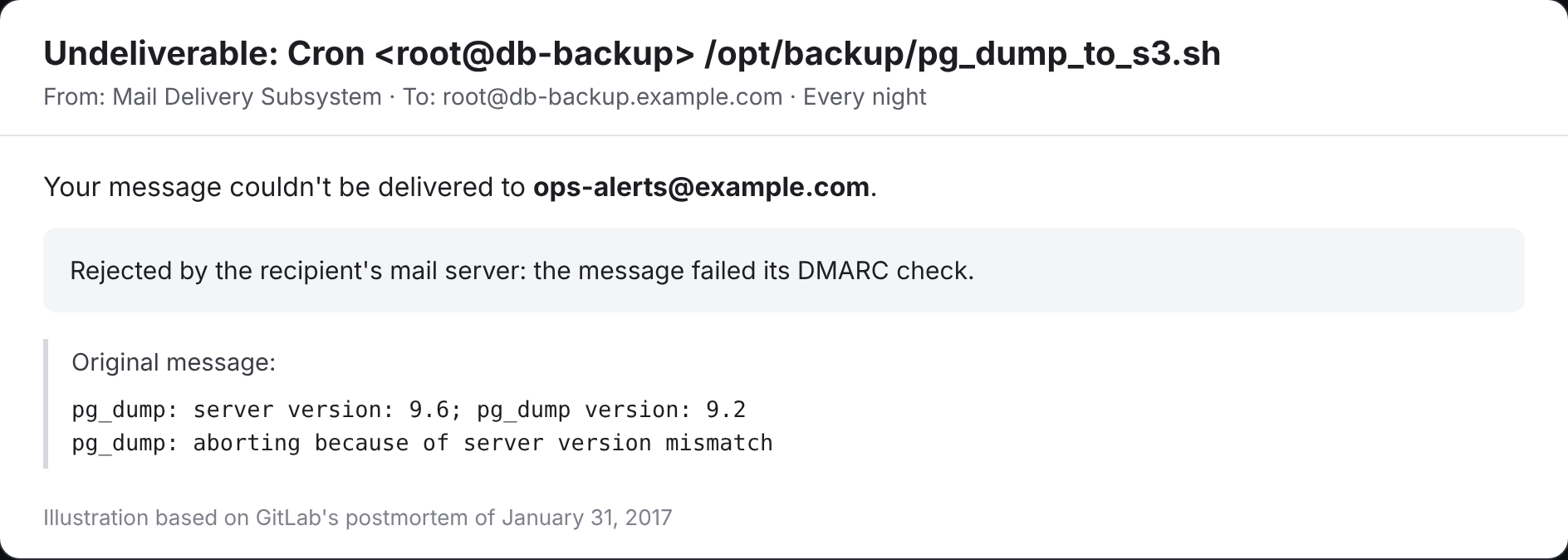
That's when the team found out its backups weren't working. The daily pg_dump to S3 had been producing nothing, because the job ran pg_dump 9.2 against a 9.6 database. The emails reporting the failures had been rejected by the receiving mail server.
A staging snapshot taken about six hours earlier saved them. GitLab concluded that nobody owned testing the backups, and its fixes included naming an owner for data durability and automating restore tests.
GitLab's postmortem of the outage is worth reading in full. It's unusually candid, though the tools and versions are from 2017.
Real SOPs to compare:
- GitLab's WAL-G backup runbook: how GitLab.com backs up Postgres now, with automated restore tests that page someone if they stop.
- Wikimedia's MariaDB backups: snapshots four days a week, weekly logical dumps, how long each is kept, and how to recover from each.
- GOV.UK's RDS restore playbook: restoring a database from a snapshot and switching the app over to it, step by step, including as a drill.
14. Warehouse SOP Template: Cycle Count Procedure
Step-by-step · Adapted from the GAO's guide to physical counts
Use this to check whether the stock on your shelves matches what your system says. The example is a warehouse, but it should work for any stockroom.
Cycle count: <warehouse>
Owner: <inventory control lead>
Schedule: A items every <month>, B every <quarter>, C every <year>. Every item gets counted at least once a year.
Counters: where possible, people who don't pick, receive, or put away in that area.
- Print today's count list: item, description, location. No quantities.
- Freeze the location, or note the last transaction time before you count.
- Count and record. Open any box that isn't factory sealed.
- A second person enters the counts and compares them with the system.
- Variance over <tolerance>? A different counter recounts within 24 hours.
- Still off? Research before adjusting: recent receipts, picks, moves, unit of measure.
- Adjust the record with a reason code. Adjustments over <$X> need <manager> approval.
- Report weekly: accuracy rate = accurate counts / items counted. Goal: <95% or more>.
Start with a blind count of 50 locations this week.
- How many match the system exactly?
- For the ones that don't, can you tell whether the error came from receiving, picking, or data entry?
In 2002, the GAO, the US government's audit office, studied how seven companies known for managing inventory well count their stock. Eight of the 12 locations it studied used cycle counting, which means counting a portion of the inventory on a regular schedule until all of it has been covered.
At 10 of the 12 locations, counters worked blind. They got the part number and the location, but not the quantity the system expected. The GAO's example shows why. If a box holds 20 items and the record says 1, a counter who can see the record may write down 1.
You can read the GAO's executive guide to physical counts from 2002. It's more than 20 years old, but its 12 key factors still cover the whole job, from who's accountable to what to do with the results.
Real SOPs to compare:
- Fermilab's cycle count procedure: daily counts picked by ABC class instead of a yearly inventory, with recounts and a supervisor's sign-off.
- North Carolina's cycle counting guide: how state agencies set ABC classes and count frequencies, enter counts, and approve or order recounts.
- Colorado's cycle counting policy: state warehouses count at least once a fiscal year, freeze stock during the count, and get reconciliations approved.
15. Supply Chain SOP Template: Supplier Approval Table
Decision table · Our response to the Senate's counterfeit parts findings
Use this to decide which suppliers you can buy from, and how much checking each kind of supplier needs first.
Supplier approval: <category>
Owner: <procurement lead>
Buyers order only from the approved supplier list. Additions follow this table.
| Source | Before the first order | On every receipt |
|---|---|---|
| Original manufacturer | Contract and quality agreement | Paperwork and lot codes |
| Authorized distributor | Confirm with the maker that it's authorized | Paperwork and lot codes |
| Independent distributor | Audit, plus records tracing parts to the maker | Test a sample from every lot |
| Can't trace to the maker | Don't buy. Escalate to <role> | n/a |
Rules
- A sample that passes approves that lot only, never the next one.
- Suspect parts are quarantined and reported to <quality, the customer, industry database>. They don't go back to the seller.
- Brokers count as independent distributors.
- Review each supplier's tier every <12 months>, and right after a failed test.
Start by listing every supplier you bought from last year and how each one got onto the list.
- How many can you trace back to the original maker?
- When a part is out of stock everywhere, who decides whether a broker is good enough?
In 2012, the Senate Armed Services Committee published what it found after a year of investigating counterfeit electronics in the US military's supply chain. It counted about 1,800 cases, covering more than 1 million suspect parts.
Testing didn't always catch them. In one case, a supplier's 18 sample chips tested authentic, and more than 10,000 chips were then accepted without further independent testing. The committee concluded that relying on unvetted independent distributors creates unacceptable risks.
You can read the committee's summary of its findings, and the full report has the case studies. It's about defense electronics and dates from 2012, so treat the names as history and the buying rules as the part to borrow.
Real SOPs to compare:
- EPA's procedure for avoiding counterfeit IT products: buy from manufacturers and authorized resellers, use other sellers only as a last resort, and quarantine suspects instead of sending them back.
- Ultra Maritime's counterfeit parts prevention plan: a defense supplier's buying rules by source, including customer approval before using a broker.
- DLA's Qualified Suppliers List program: how the Defense Logistics Agency qualifies manufacturers and distributors, with renewal every three years.
16. Mission Control SOP Template: If-Then Flight Rules
If-then rules · Adapted from NASA's Apollo flight mission rules
Use this for rare, high-stakes moments when there won't be time to work out the answer. The example is a software team, but it should work for any emergency you can plan for.
Flight rules: <system>
Owner: <team> · Last rehearsed: <date>
| Field | What to write | Example |
|---|---|---|
| Rule | <section>-<n>: <short name> | 2-04: Error spike after a deploy |
| Condition | <what you observe, with a number> | 5xx rate above <2%> for <5> minutes, within an hour of a deploy |
| Phase | <when it applies: always, during deploys, during migrations> | Any deploy |
| Ruling | <the decision, made in advance> | Roll back first. Debug afterward, on the old version. |
| Notes | <how to recognize it, who can override it, why we decided this> | The on-call engineer decides alone. Rolling back needs no approval. |
Start by listing the five worst things that could happen to your system this quarter. For each one, what should the first person who notices do in the first ten minutes? Then rehearse one as a drill, and rewrite any rule that doesn't survive it.
NASA wrote rules like these for the Apollo missions. In a 1974 report, Larry Keyser of the Johnson Space Center describes flight mission rules as agreements on what to do when things don't go to plan. The Apollo 11 rules were laid out in columns: the condition, the mission phase, the ruling, and notes on what to watch for.
The rules were tested before anyone relied on them. Teams ran them in simulations starting about 90 days before liftoff, and rewrote any rule that turned out to be wrong or impossible to carry out.
According to Keyser, about 80% of in-flight problems had been analyzed before launch, so the response was nearly automatic.
Keyser's Apollo report on flight mission rules is about ten pages and reads in one sitting. For the developer version, browse git-flight-rules.
Real SOPs to compare:
- The Apollo 11 flight mission rules: the final rules for the first Moon landing, approved by Chris Kraft and laid out in those columns.
- The STS-117 flight rules annex: Shuttle rules for a 2007 space station mission, written as if-then rulings with a rationale under each.
- The Prometheus Operator runbooks: one page per alert in kube-prometheus, saying what it means, its impact, and how to diagnose and mitigate it.
How to Write an SOP
Most SOPs answer the same basic questions:
- Why does this procedure exist?
- When should someone follow it?
- Who is responsible?
- What should they do if something goes wrong?
- How does someone decide that the job is done?
Here's how to build your own. You can use these steps along with our SOP template (Word / Google Docs / PDF).
1. Start with what could go wrong
When deciding which processes need an SOP, think about the consequences of getting them wrong.
For example, Google's SRE book lists several events that should trigger a postmortem, including user-visible downtime, data loss and an on-call engineer having to roll back a release. Each is a good starting point for writing an SOP.
Use the purpose section to explain what you're trying to prevent. In a food cooling SOP, for example, the purpose would be "preventing foodborne illness". It helps the reader understand why the procedure matters in the first place.
2. Write Down the Trigger, the Owner, the Finish Line
As for the trigger part, Google's three tests for declaring an incident (user-visible downtime, data loss, on-call engineer having to roll back a release)are a good model because anyone can apply them in the moment.
Assign ownership to a role rather than an individual.
Always define a clear finish line for the procedure, and also for every step in the procedure, in a done_when field.
3. Choose a format based on who will use it
- An experienced surgeon doesn't need detailed instructions on how to perform an operation. A checklist at critical points during surgery is more useful here.
- Someone learning a new job, on the other hand, needs detailed instructions that explain what to do, how to do it and why.
- Decision tables work well when the next action depends on a few known conditions.
- For rare emergencies, it helps to have predefined if-then rules.
- When work passes from one person to another, a handoff procedure with a read-back can prevent misunderstandings.
The format table below covers when to use each one.
| Format | Use it when | Examples |
|---|---|---|
| Checklist | People who know the work have to confirm a few items that can't be missed. | #1, #5, #7, #9 |
| Runbook | Something has broken, or a risky operation is about to run, and the order of steps matters. | #2, #6, #13 |
| Work instruction | A new person is learning a hands-on job. | #3 |
| Step-by-step | The work has to go the same way every time, with a check or a limit at the steps that matter. | #4, #10, #14 |
| Decision table | The right action depends on a few facts about the case. | #11, #12, #15 |
| Handoff | The work keeps running while the people change. | #8 |
| If-then rules | A rare emergency leaves no time to think, so the decision is made in advance. | #16 |
Even a specific format, like a checklist, can work in different ways. In their 1990 NASA study, Asaf Degani and Earl Wiener describe how flight crews configure the cockpit from memory and then verify their work using a challenge-and-response checklist. The alternative is a do-list, where the crew follows each instruction in sequence, but it takes longer and removes the independent verification that the first approach provides.
Consider how much time the reader has, too. Degani and Wiener found that one airline used 13 checklist items for a phase of flight that another covered in 50. As the case of Flight 1549 illustrates, a procedure is of little use if there isn't enough time to follow it.
4. Write Each Step as an Action, a Check and a Reason
Start every step with a verb and keep one action to a step, the way TWI's important steps do. Then add the check that proves the step worked: a host count after a deploy, a thermometer reading during cooling, etc.
Add the reason wherever someone might be tempted to skip the step. TWI's sheet gives it a whole column for that reason.
Put warnings before the step they apply to. The US Department of Energy's 1992 writer's guide for technical procedures puts warnings and cautions immediately before their step, on the same page. It cites an industry study that tied about a quarter of human performance events to warnings and cautions that weren't properly provided.
5. Explain what to do when things go wrong
An SOP should cover more than the steps someone follows when everything goes according to plan.
For every check in every step, explain what to do if it fails. The food cooling SOP distinguishes between food that can still be safely handled through corrective action and food that must be discarded after a failed check. The incident runbook specifies when engineers should stop routine troubleshooting and declare an incident.
6. Test It on Someone Who Didn't Write It
It's difficult to spot gaps in a procedure when you already know how to do the job.
We recommend testing draft SOPs with someone other than the author. After doing something similar, hospitals participating in the WHO surgical checklist study decided to adapt and translate the checklist to suit their local workflows before introducing it.
Give the SOP to someone who didn't write it and watch them follow it. Pay attention to where they hesitate, ask questions or interpret an instruction differently from what you intended. These are good places to start making revisions.
You don't always need an elaborate testing exercise. For incident response procedures, Google's SRE book suggests role-playing the response to an incident your team has already resolved.
7. Give It an Owner, a Version and a Review Date
Version your SOPs the same way you version your code and your docs.
Review your SOPs every one to three years, depending on the risk involved.
Don't wait for a scheduled review if something goes wrong. As Google puts it in its chapter on postmortems, "You can't 'fix' people, but you can fix systems and processes". After an incident, look at the SOP. Was a step missing? Was an instruction unclear? Did someone skip a step, and if so, why? Update the procedure to prevent the same mistake from happening again.
Can Claude or ChatGPT Write an SOP?
Yes. ChatGPT, Claude, or Copilot can turn a rough description of a process into a clean first draft.
But AI doesn't know how things work at your company. So you definitely need a human to craft it today.
There's research to back this up. SkillsBench, a 2026 benchmark covering 87 tasks, tested how well AI agents perform when given written procedures called Skills. Human-curated procedures improved the average pass rate from 33.9% to 50.5%. Interestingly, when agents wrote their own procedures, they performed worse than they did without any procedures across all three setups tested.
Getting AI to follow your SOPs is harder. Our guide to making agents follow SOPs explains how to write SOPs for agents and how to test them. Here's what one looks like in practice.
Example: The Incident Runbook as a Skill
Here's the incident runbook from example 2, rewritten for an agent that assists a human incident commander. It's written as an agent skill.
---
name: responding-to-incidents
description: Runs the first hour of a production incident for <service>. Use when an alert fires, a customer reports an outage, or someone says "incident".
---

# Incident response for <service>

You assist the incident commander (IC). The IC is a person and makes every
decision.

## Copy this checklist into the incident channel and keep it updated
- [ ] 1. Incident or not? Yes if another team is needed, customers can see it,
      or it's unsolved after 1 hour of debugging.
- [ ] 2. Set severity using references/severity.md. Unsure between two levels?
      Use the higher one.
- [ ] 3. Page the IC: run `scripts/page_ic.sh <severity>`. Don't change the
      command or add flags.
- [ ] 4. Create the incident doc from templates/incident.md. Fill in impact,
      status and next update time.
- [ ] 5. Run `scripts/recent_deploys.sh 2h`. If a deploy matches the start
      time, propose a rollback to the IC.
- [ ] 6. Post a status update every 30 minutes, even if nothing changed.

## Ask the IC before you
- Roll back, restart or change any production setting
- Post anything outside the incident channel
- Delete or edit any data

## Stop and hand back to the IC when
- The IC tells you to, or closes the incident
- A script fails twice in a row
- You can't tell which service is affected

## Why these rules exist
Only one person changes production during an incident, so fixes don't collide.
Regular updates keep stakeholders from interrupting the people doing the
fixing.
This is part of what we're building at Trail: a shared memory for humans and agents working together. Trail's Agent Builder takes an SOP your team has already written and turns it into an agent. You can trace each rule back to the original document and review it before deploying.
SOP Template FAQs
What are the 5 components of an SOP?
Most business templates share the same five: a purpose, a scope, roles and responsibilities, the procedure, and a revision history.
Real SOPs vary more than that. The Institute of Child Nutrition's food safety SOPs have six parts, and EPA's layout for a technical SOP runs to twelve sections.
If you can only keep five, keep the ones that change what people do. Those are a purpose that names the failure, a trigger, steps that each have a check, an exit for when a check fails, and a done-when line.
What is the format for an SOP?
There isn't one format. Here are seven commonly used ones: checklist, runbook, work instruction, step-by-step, decision table, handoff, and if-then rules. The format table shows when to use each.
Does Word have SOP templates?
Microsoft's own guide doesn't hand you an SOP file. It walks you through generating one with Copilot in Word, then saving the result as a reusable template. As per research, AI-written SOPs are not effective today.
If you'd rather start from a file, download ours. It's a plain .docx with the blank template and the filled onboarding example. The same template is a Google Doc you can copy.
How do I write a standard operating procedure?
Write it in seven steps. Start from the failure you can't afford. Write down the trigger, the owner, and the finish line. Pick the format that fits the reader and the clock.
Then write each step as an action, a check, and a reason. Decide the exits before you need them. Test the draft on someone who didn't write it, and give it an owner, a version, and a review date.
The how-to section above covers each step with examples.
Final Thoughts
The best way to write a good SOP is to not treat it like a one-time job. Start by talking to the people who do the procedure in question, document the steps they follow, and refine the instructions as you spot gaps and inefficiencies. Then hand it to someone who didn't write it, and fix whatever they trip over.
Found a better SOP, or an environment we should have covered? Write to us at support@trailhq.com.