
A month-end close checklist lays out the tasks your finance team needs to complete each month, in what order, and by when.
Our checklist covers 13 core tasks for an accrual-basis close, with a deadline and clear completion criteria for each. We then specify tasks that might be specific to your business, like reconciling Stripe payouts or eliminating intercompany balances.
The Excel / Google Sheets workbook includes the checklist with columns to track owners, reviewers, status, links to supporting evidence. Each business type also has its own tab with a complete checklist.
Jump to your business: Small business · SaaS · E-commerce · Nonprofit · Startup · Manufacturing · Bank or credit union · Professional services · Multi-entity · Public company
Also on this page: Design your own · Use it with AI · FAQ
Core Month-End Close Checklist
All days in the checklists are business days. WD-2 means two business days before month-end, WD1 means the first business day after month-end, and so on.
| When | Task | Done when |
|---|---|---|
| WD-3 | Send the close calendar and cutoff times to everyone who feeds the books | Every task owner has confirmed their dates |
| WD-1 | Cut off purchasing, billing and expense submissions for the month | Nothing new is dated to the month after cutoff without an approved exception |
| WD1 | Pull every bank and card statement straight from the bank | Every account on your bank-account list has a full-month statement |
| WD1 | Reconcile every bank and card account | The ledger equals the statement, or each difference is listed with a date, an amount and a reason |
| WD1 | Post payroll, payroll taxes and benefits | Payroll expense ties to the payroll provider's register |
| WD2 | Close AP and accrue for goods and services received but not billed | The AP subledger equals the GL, and each accrual has support and a reversal date |
| WD2 | Record revenue and reconcile AR | The AR aging equals the GL, and revenue ties to invoices or contracts |
| WD2 | Post recurring entries: depreciation, amortization and prepaids | Each schedule's ending balance equals the GL |
| WD3 | Reconcile every other balance sheet account | Each account has a reconciliation with a preparer and a different reviewer |
| WD3 | Compare the P&L and balance sheet with last month and budget | Every line past your threshold has a one-sentence explanation tied to a transaction |
| WD4 | Review and post final adjustments | The reviewer has signed off, and no entry is left in draft |
| WD5 | Prepare the income statement, balance sheet and cash flow statement | The statements agree with the final trial balance, and ending cash on the cash flow statement equals cash on the balance sheet |
| WD5 | Lock the period and send the reporting package | The period is locked in the system, and the package has reached its readers |
Add these four rows if they apply to you:
| When | Task | Done when |
|---|---|---|
| WD2 | If you hold inventory: reconcile it to the inventory system or the latest count, and book cost of goods sold | Inventory in the GL equals the inventory system or the count |
| WD2 | If you bought or sold fixed assets: add them to, or remove them from, the fixed asset register | Additions and disposals in the register match the GL, and depreciation starts or stops with them |
| WD3 | If you have loans: record the interest and reconcile each loan | Each loan balance equals the lender's statement |
| WD3 | If you collect or owe taxes: reconcile sales, payroll and income tax payable | Each payable equals the return or tax report for the period |
If you’re closing the books for multiple legal entities, use the multi-entity checklist, which also covers intercompany transactions.
Each row in the checklist has a corresponding task card that details who prepares the work, who reviews it, and what supporting documents to keep. Here's what the task card for bank reconciliation looks like:
id:          BANK-01
when:        WD1
owner:       Staff accountant
reviewer:    Controller
inputs:      Bank statements from the bank portal, GL cash accounts
steps:       Match the ledger to each statement. List every difference.
done_when:   Ledger equals statement, or every difference is listed with a
             date, an amount and a reason. Items 31 to 60 days old also
             show the owner's next step and a date
evidence:    Reconciliation and statements saved to close/2026-11/BANK-01
escalate_if: Any unexplained difference, or any item older than 60 days
The card also groups open items by how long they've been outstanding. Items less than 30 days old are usually just timing differences. For items between 31 and 60 days old, the staff accountant follows up and notes what needs to happen next. Anything over 60 days goes to the controller.
Start by making sure your list of bank accounts is complete. Don't overlook accounts opened by subsidiaries or founders. For each account, identify who downloads the bank statement and where it's stored.
Another good example is Keiter's financial close checklist. It breaks down the close into daily tasks rather than giving you a long list of things to get done.
1. Small Business Month-End Close Checklist (QuickBooks or Xero)
Records
In most small businesses, the owner approves expenses, someone manages the books in QuickBooks or Xero, and an external accountant takes care of taxes.
Much of the month-end close comes down to clearing the bank feed, splitting loan payments into principal and interest, and matching payment processor payouts to sales.
So you can simplify the core checklist. If one person manages the books, you may not need a formal close calendar or separate reviews for cutoffs and final adjustments. You can also generate financial statements directly from your accounting software. If your accountant handles depreciation and prepaid expenses at year-end, leave those entries to them.
Keep the remaining tasks and add the following:
| When | Task | Done when |
|---|---|---|
| Weekly | Categorize the bank and card feeds | Uncategorized and suspense accounts are at zero by month-end |
| WD1 | Match each Stripe, Square, PayPal or Shopify payout to its sales | Each payout equals sales minus fees and refunds for the days it covers |
| WD1 | Clear Undeposited Funds in QuickBooks | The balance holds only deposits that reached the bank after month-end |
| WD2 | Split loan payments into principal and interest | The loan balance equals the lender's statement |
| WD2 | Reconcile sales tax payable | The payable equals your sales tax report for the period |
| WD2 | Record owner draws and contributions | Equity accounts match what the owner moved in and out |
| WD3 | Attach receipts to card and expense transactions | Every transaction above your threshold has a receipt |
| WD5 | Export the month's reports and bank statements to a folder you own | The P&L, balance sheet, general ledger and statements are saved outside the accounting app |
Why the export row exists: On December 27, 2024, Bench shut down without warning and took its platform offline, and thousands of small businesses lost access to their books days before the new year. A monthly export makes it much easier to switch accountants or accounting software if you ever need to.
Try downloading last month's general ledger. Could another accountant work with it tomorrow? Are there any accounts or balances you don't understand?
We'd recommend reading the TechCrunch article on Bench's collapse and Intuit's QuickBooks month-end checklist. The former shows the risks of relying on a single vendor for your records. The latter is a useful starting point for closing your books each month, although it doesn't explain how to tell when each task is complete.
2. SaaS Month-End Close Checklist
Revenue
If you bill customers through Stripe or a similar billing platform, recognize revenue over the subscription period, and report ARR to your board, there are a few more things to account for during month-end close.
You'll need to make sure your billing data matches the general ledger, update your deferred revenue schedule, and explain any differences between ARR and GAAP revenue.
Add the following steps to your standard close process:
| When | Task | Done when |
|---|---|---|
| WD1 | Tie the billing system (Stripe, Chargebee, Zuora) to invoices posted in the GL | Billings match by month, and any difference is listed |
| WD1 | Reconcile processor payouts to bank deposits | Each payout is matched, with fees, refunds and disputes booked gross |
| WD2 | Run revenue recognition and roll deferred revenue forward | Opening balance plus billings minus recognized revenue equals the closing balance, and the subledger equals the GL |
| WD2 | Accrue usage or overage revenue billed in arrears | The accrual equals usage times price from the usage report |
| WD2 | Amortize capitalized sales commissions | The commission schedule equals the GL asset |
| WD3 | Reconcile the sales tax engine to sales tax payable | The payable equals the tax engine's report |
| WD3 | Put hosting, support and embedded software into cost of revenue | Gross margin uses the same cost-of-revenue policy as last month |
| WD4 | Bridge ARR and MRR to GAAP revenue | Every difference in the bridge has a named cause |
A good exercise is to pick a customer who upgraded their subscription halfway through the month. Follow the transaction through billing, deferred revenue and ARR. Do the numbers tell a consistent story? If they don't, which system do you trust? Can you make the numbers consistent?
If you want to get into the accounting behind this, Ben Murray's guide to SaaS revenue recognition and deferred revenue is a good place to start. He explains the subject from a SaaS CFO's perspective, with practical examples.
Stripe's documentation on payout reconciliation explains how charges, refunds and fees reconcile with what actually hits your bank account.
It's also worth reading GitLab's public finance handbook to see how a large SaaS company runs its month-end close. Their accounting team meets daily during the close, and the FP&A team typically locks its forecast within 48 hours of closing the books.
3. E-commerce Month-End Close Checklist
Tax and settlements
Month-end close is a little more complicated for e-commerce businesses. You sell through multiple channels, receive payouts with fees already deducted, and collect sales tax from customers in different states.
You need to match payouts to individual sales, account for fees, refunds, and reserves, keep track of inventory and cost of goods sold (COGS), and make sure you meet your sales tax obligations in each state.
Beyond the usual month-end close tasks, here's what you need to do:
| When | Task | Done when |
|---|---|---|
| Weekly | Match each Shopify, Amazon, PayPal or Stripe payout to its settlement report | Sales, fees, refunds, chargebacks and reserves are booked separately, and the net equals the deposit |
| WD1 | Reconcile marketplace clearing accounts | Each clearing account holds only payouts still in transit at month-end |
| WD2 | Count or roll forward inventory and book cost of goods sold | Inventory in the GL equals the inventory system, and counts happened on schedule |
| WD2 | Book freight-in and other landed costs to inventory | Landed costs sit in inventory, not in expense |
| WD2 | Accrue a reserve for expected returns | The reserve uses your recent return rate, and the calculation is saved |
| WD2 | Record gift card and store credit liabilities | The liability equals unredeemed balances in the platform |
| WD3 | Compare sales by state with each state's nexus threshold | Every state where you cross a threshold is registered or flagged |
| WD3 | Reconcile sales tax collected to sales tax filed | Tax payable equals the tax report, state by state |
Why track sales tax thresholds? In 2018, the Supreme Court ruled in South Dakota v. Wayfair that states could require businesses to collect sales tax even if they had no physical presence in the state. At the time, South Dakota's threshold was $100,000 in annual sales or 200 separate transactions. As your business grows, it's easy to cross a state's threshold without noticing.
Pull last month's orders and group them by shipping state. Check your cumulative sales against each state's threshold. Is someone on your team responsible for tracking this?
If you're curious about how this rule came about, Justice Kennedy's opinion in South Dakota v. Wayfair (2018) explains the previous rule and why the Court overturned it.
If you use Stripe, its reconciliation guide explains how to match payouts with bank deposits. Other payment platforms may offer similar reconciliation reports.
4. Nonprofit Month-End Close Checklist
Restrictions
A nonprofit is usually funded by grants and donations, some of which come with restrictions on how the money can be spent.
You'll need to track restricted donations, release restrictions once the funds have been used for their intended purpose, and allocate shared expenses across programs, management and fundraising.
In addition to the core close tasks, include the following:
| When | Task | Done when |
|---|---|---|
| WD1 | Reconcile the donor database to contribution revenue in the GL | Gifts by fund match between the two systems |
| WD2 | Record pledges and grants receivable, and hold back conditional grants | Unconditional promises are booked, and conditional ones wait until their conditions are met |
| WD2 | Code expenses to grants and funds | Every expense charged to a grant fits that grant's budget and terms |
| WD3 | Release restrictions whose purpose was met or whose time passed | The restricted net assets schedule equals the GL, and each release cites the expense or date behind it |
| WD3 | Allocate shared costs to program, management and general, and fundraising | The split follows your written method, such as time records or floor space |
| WD4 | Prepare budget-to-actual reports for each grant | Each report ties to the GL and reaches the funder by its due date |
| Monthly | Track federal award spending for the year | You know whether you'll pass the single audit threshold |
Why the release row exists: Bec Morris of the CPA firm Barnes Dennig highlights a common oversight in nonprofit accounting. A donor's conditions have been met, a time restriction has expired, or funds have been spent for their intended purpose, but no one records the release. While the total net assets are still correct, the board doesn't have an accurate view of the funds available to spend.
A good place to start is with your largest restricted gift. Can you account for every dollar spent against it? Do you know when the restriction expires and who is responsible for recording the release?
For more guidance, see Bec Morris's 2026 pre-close checklist for nonprofits. She writes about the year-end close, but much of her advice on restrictions and allocations applies to the monthly close as well.
5. Startup Month-End Close Checklist
Controls
Your startup just raised a round, expense approvals still happen over Slack, and you're preparing for your first audit. It's time to put a formal financial close process in place.
That means keeping a record of who approved what, tracking all your bank accounts, and getting the accounting right for stock options, SAFEs, and convertible notes.
Beyond the usual month-end close tasks, you'll need to:
| When | Task | Done when |
|---|---|---|
| WD-1 | Update the list of every bank, card and crypto account, with its signers | The list matches what each bank reports, and every account has an owner |
| WD1 | Reconcile every account on that list, including any held by a subsidiary | No account on the list is left unreconciled |
| WD2 | Match each payment above your approval limit to a recorded approval | Every payment has an approver who isn't the person who asked for it |
| WD2 | Book stock-based compensation from the cap table | The expense matches the cap table platform's report |
| WD2 | Record SAFEs, convertible notes and accrued interest | Every instrument on the cap table is in the GL, classified the way your auditor expects |
| WD3 | Accrue for vendor invoices still sitting in someone's inbox | Every recurring vendor has a bill, a card charge or an accrual for the month |
| WD4 | Update runway: cash, net burn and months left | Cash ties to bank statements, and burn ties to the P&L |
| WD5 | Send the board package | Financials, KPIs and commentary all tie to the closed books |
When John J. Ray III took over FTX in November 2022, he found that employees approved payments with emojis in a chat and that the company didn't even have an accurate list of its bank accounts. He said he had never seen “such a complete failure of corporate controls.”
But these problems aren't unique to FTX.
Search your company's Slack or Teams messages for the word “approved.” How many payments were approved over chat last month? Now imagine an auditor asking you to produce those approvals a year from now. Would you know where to look?
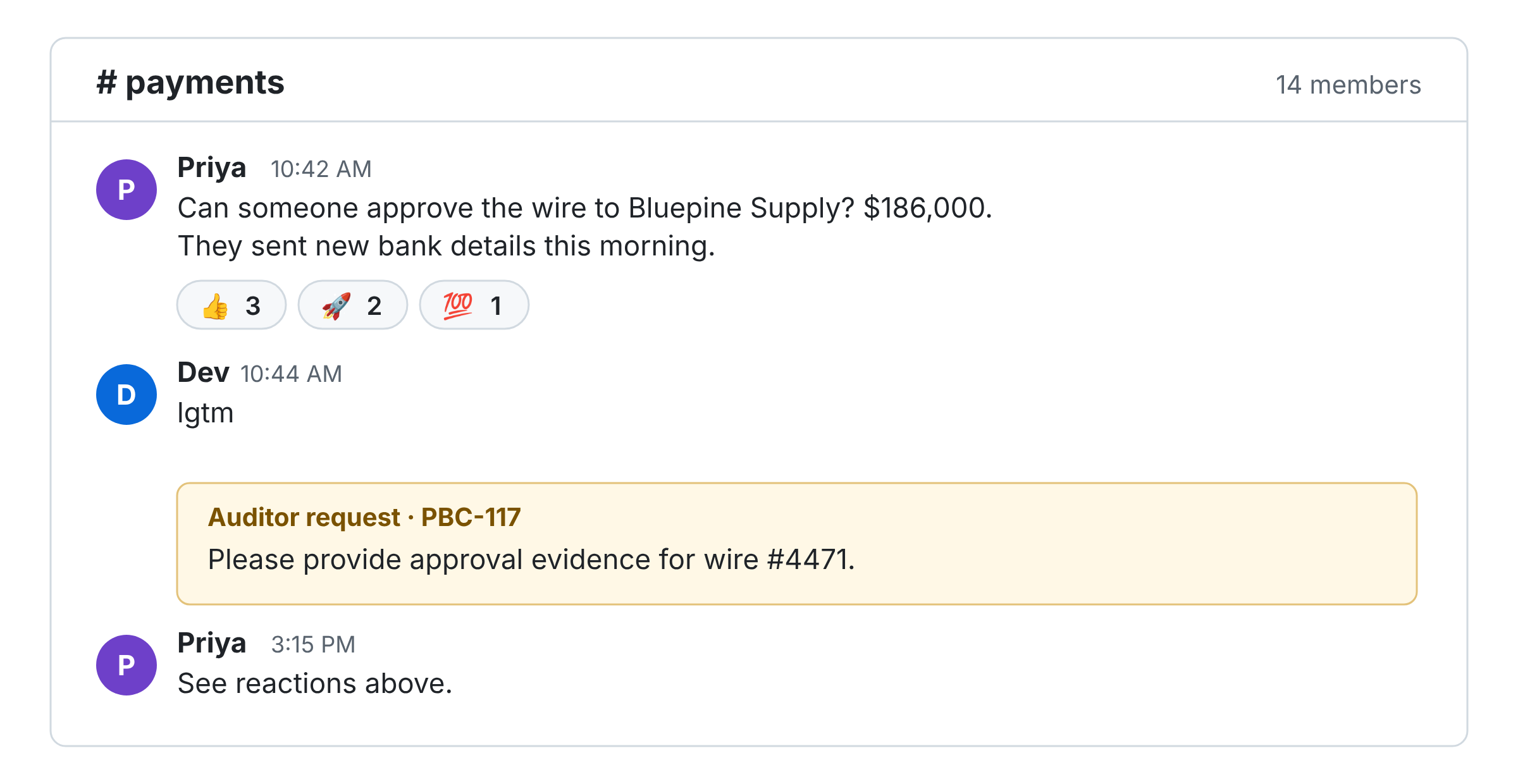
If you're interested, read the full text of Ray's first-day declaration or Bloomberg Law's pick of its wildest passages.
6. Manufacturing Month-End Close Checklist
Inventory
Are you building the month-end close for a company that buys raw materials, manufactures products, and ships them from a warehouse?
If so, you’ll need to value inventory, account for differences between standard and actual costs, and record accruals for goods received but not yet invoiced.
Alongside the core close tasks, include the following:
| When | Task | Done when |
|---|---|---|
| WD-1 | Cut off receiving and shipping | The last receipt and the last shipment of the month are documented |
| WD1 | Accrue goods received but not invoiced | The accrual equals receipts with no matched invoice, listed by purchase order |
| WD1 | Close finished work orders and move them out of work in progress | Work in progress holds only open work orders |
| WD2 | Reconcile the inventory subledger to the GL | The perpetual inventory value equals the GL |
| WD2 | Review cycle counts and book the adjustments | Every count variance above your threshold has a cause |
| WD2 | Analyze purchase price, usage, labor and overhead variances | Each variance above your threshold is explained, and capitalized variances follow your policy |
| WD3 | Review the excess and obsolete inventory reserve | The reserve uses current demand and on-hand quantities, and the method is saved |
| WD3 | Book freight-in, duties and other landed costs | Landed costs sit in inventory, not in expense |
Why the reserve row exists: In 2000, Cisco’s CFO wrote that the company could “literally close our books within hours.” Yet by April 2001, Cisco had to take a $2.25 billion charge for excess inventory as quarterly sales fell from $6.7 billion to $4.73 billion. Cisco knew how much inventory it had, but it was wrong about how much it could sell.
A good place to start is with your 20 most valuable inventory items. When did each item last sell? Who decided how much stock to hold, and what assumptions did they make?
For more on the Cisco case, read CIO magazine's account of what went wrong in 2001 alongside Cisco's 10-Q from late 2001. The article explains how Cisco's forecasting failed despite its sophisticated financial systems, and the filing shows how the company revised its initial inventory charge as circumstances changed.
7. Bank / Credit Union / Fintech Month-End Close Checklist
Reconciliation
Closing the books for a bank, credit union, or fintech app comes with a few extra responsibilities. You're accounting for other people's money, not just your own.
You need to reconcile the core banking system with the general ledger daily, clear settlement and suspense accounts, and track how much of the money in each pooled account belongs to each customer.
In addition to the standard close process, you'll need the following:
| When | Task | Done when |
|---|---|---|
| Daily | Reconcile the core system to the GL and to balances at the bank or Federal Reserve | Totals match, and every difference has an owner |
| Daily | Clear card, ATM, ACH and wire settlement accounts | Each suspense or settlement account is at zero, or holds a dated list of items |
| Daily | Reconcile each pooled account to customer-level balances | The sum of customer balances equals the cash held for them |
| WD1 | Accrue interest on loans and deposits | The accrual equals the core system's interest report |
| WD2 | Review the allowance for credit losses | Model inputs are current, and the change from last month is explained |
| WD2 | Mark investment securities to market where your accounting requires it | Fair value changes are booked to the right accounts |
| WD3 | Reconcile fees, charge-offs and recoveries | Each one ties to the core system's reports |
| Quarterly | File the call report with your regulator | It's filed by the deadline, with every line tied to the GL |
Why the pooled-account row exists: Synapse, a company that connected fintech apps with banks that held their customers' money, went bankrupt in 2024. Its bankruptcy trustee Jelena McWilliams found a shortfall of $65-95 million between what Synapse's records said customers were owed and what its partner banks believed they owed. The numbers didn't add up, and customers were left unable to access their own money.
Pick any one of your pooled accounts. Can you work out how much of that money belongs to each customer? Could you still do it if your middleware provider shut down tomorrow?
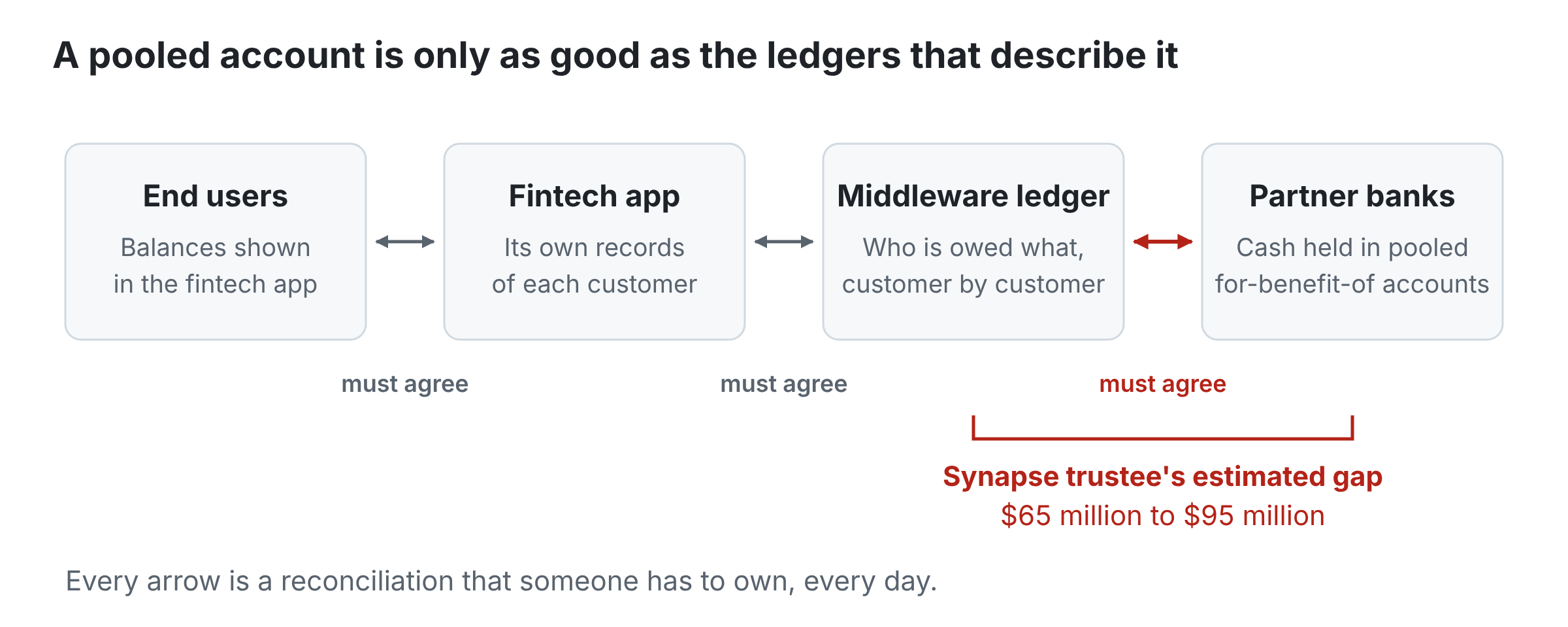
For more on the case, read the trustee's first status report (2024). It explains how the reconciliation problem unfolded. American Banker's coverage goes into the shortfall and why customers were unlikely to get all their money back.
8. Professional Services Month-End Close Checklist
Projects
For agencies, consultancies, law firms, engineering firms, the month-end close involves a few extra steps.
You need to make sure everyone has logged their hours, account for work you've done but haven't billed yet, and estimate the remaining costs of fixed-fee projects.
Include these steps in your month-end close checklist:
| When | Task | Done when |
|---|---|---|
| WD-1 | Remind everyone to submit and approve time | Approvers know the lock date and time |
| WD1 | Lock timesheets for the month | Every billable person has approved time for every workday |
| WD1 | Value unbilled work in progress | Work in progress equals approved, unbilled time at billing rates, less agreed write-downs |
| WD2 | Update estimate-to-complete on fixed-fee projects | Percent complete uses current hours and a fresh cost estimate from the project lead |
| WD2 | Flag projects forecast to lose money | Each one has a reviewed forecast, and a recorded loss where your accounting rules require it |
| WD2 | Record retainers and advance billings as deferred revenue | Deferred revenue equals work billed but not yet delivered |
| WD3 | Bill or accrue reimbursable expenses | Every pass-through cost is on an invoice or in work in progress |
| WD3 | Review margin by project and by client | Project margins tie to the GL |
Why the estimate-to-complete row exists: In July 2015, an independent investigation found that Toshiba had overstated its pre-tax profits by $1.22 billion over several years. Part of the problem was how Toshiba accounted for its long-term projects. They underestimated how much these projects would cost to complete and delayed recognizing losses. As a result, projects appeared further along and more profitable than they actually were.
Look at your three largest fixed-fee projects. How complete are they according to your financial records? Would your project leads give you the same numbers? And would your clients agree?
For more on this, read Toshiba’s 2015 investigation report (English summary), which explains where the company went wrong with its project estimates. Monograph’s month-end checklist for architecture and engineering firms is also worth reading for its practical advice on accounting for work in progress.
9. Multi-Entity Month-End Close Checklist
Consolidation
Closing the books gets even more complicated when you have entities in multiple countries, each with its own currency, ledger and reporting deadlines.
You need to reconcile intercompany balances before eliminating them, handle foreign currency revaluation and translation, and collect consistent evidence for cash balances across all entities.
In addition to the standard close activities, include the following:
| When | Task | Done when |
|---|---|---|
| WD-2 | Send the group calendar, local deadlines and the month-end rate source | Every entity has confirmed its dates |
| WD1 | Post intercompany charges, loans and interest | Both sides are booked in the same month at the same rate |
| WD2 | Confirm intercompany balances with each counterparty | Each pair agrees, or one side owns the difference and fixes it |
| WD2 | Revalue foreign currency balances at month-end rates | Revaluation uses the group's rate source, and gains and losses are booked |
| WD3 | Confirm each entity's cash with the bank directly | Every cash balance in the consolidation comes with a statement pulled from the bank or its portal |
| WD3 | Translate each entity into the group currency | Balance sheets use month-end rates, the P&L uses average rates, and the translation difference is calculated |
| WD4 | Consolidate and eliminate intercompany balances | Eliminations net to zero, and minority interests are calculated |
| WD4 | Review transfer pricing charges against policy | Each charge follows the documented method |
Wirecard claimed to have €1.9 billion, which was roughly a quarter of its balance sheet, in trust accounts at two Philippine banks. In June 2020, its auditor refused to sign off on its accounts, and both banks denied having any dealings with the company. The learning here is that no matter who manages the cash, you should get confirmation directly from the bank.
Look at each entity in your group and trace how its cash balance ends up in the consolidated accounts. Are any of these figures pulled from manually prepared spreadsheets? When was the last time someone independently checked them against bank records?
For more context, read Wirecard's statement from June 22, 2020 alongside CNBC's coverage of the banks' denials.
10. Public Company Month-End Close Checklist
Controls
This section is relevant for you if you build the close process for a company that files with the SEC. Every number in the 10-Q must be backed by documented controls, and the close must meet strict reporting deadlines.
You'll need to review manual journal entries, document each review, and manage disclosures alongside the financial close.
Add the following steps to your core close process:
| When | Task | Done when |
|---|---|---|
| WD-3 | Confirm the owner of each key control for the period | Every key control has an owner and a backup |
| WD2 | Review manual and top-side journal entries above your threshold | Each one has support, a preparer and a different approver |
| WD3 | Sign off every balance sheet reconciliation | Preparer and reviewer sign-offs are dated within the close |
| WD3 | Run flux analysis against documented thresholds | Every line past the threshold has a written explanation |
| WD4 | Review significant estimates such as reserves, impairments and revenue judgments | Each estimate has a memo and a reviewer |
| WD5 | Calculate EPS, stock compensation and the equity roll-forward | Each ties to the cap table and the GL |
| Quarter-end | Run the disclosure checklist and the disclosure committee | The draft 10-Q ties to the closed books |
| Quarter-end | File the 10-Q | It's filed within 40 days of quarter-end for large accelerated and accelerated filers, or 45 days for everyone else |
Why the journal-entry row exists: In June 2002, the SEC charged WorldCom with accounting fraud worth $3.8 billion. The company had used ordinary journal entries to record payments to other carriers as capital expenditures rather than operating expenses. Five weeks later, the Sarbanes-Oxley Act became law. Today, journal entry reviews are a routine part of the financial close at public companies.
Pull up every manual journal entry above your review threshold from last quarter. Look at who prepared each entry and who approved it. Could the approver explain why the entry was made without having to ask the preparer?
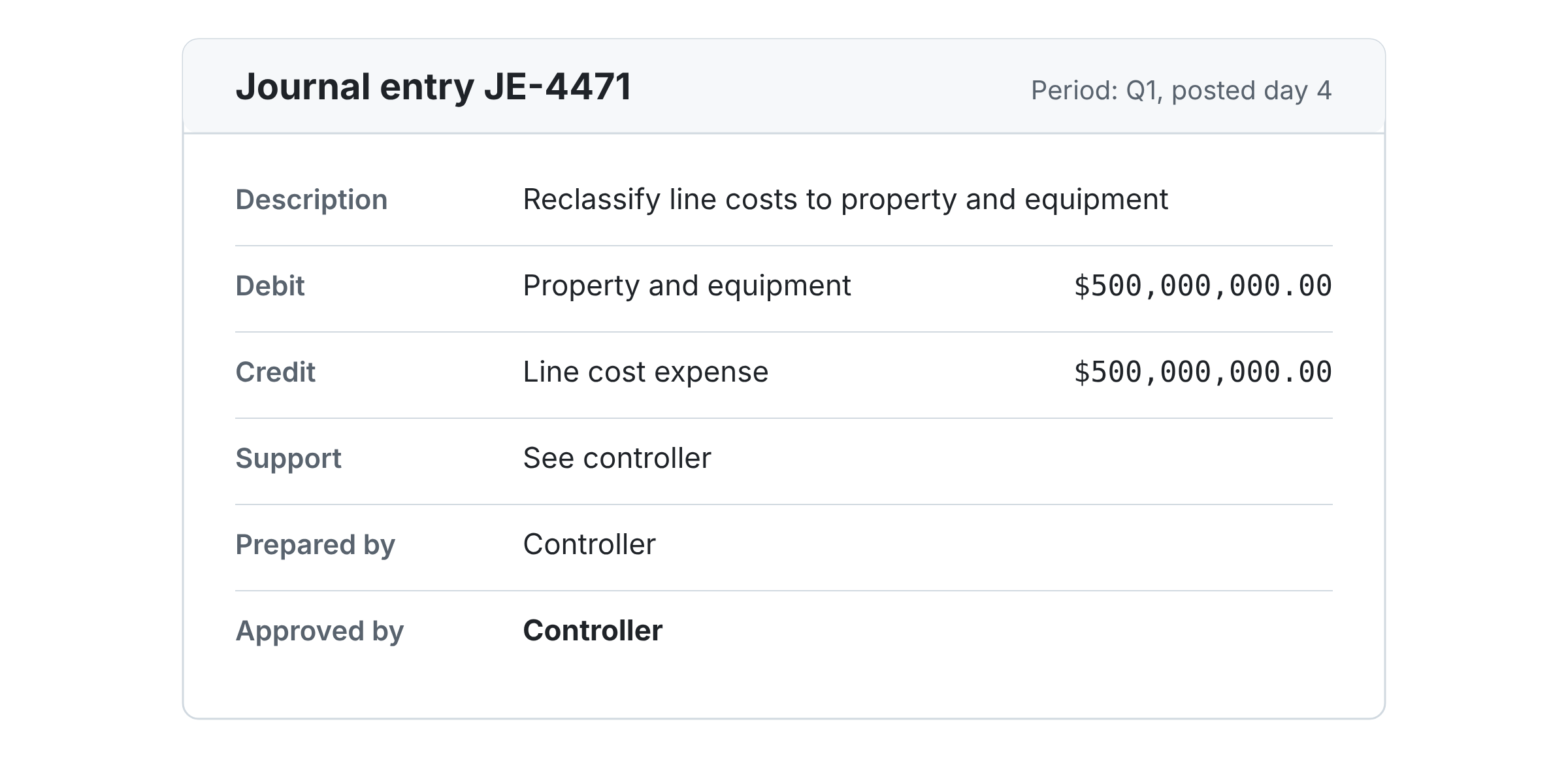
The 2002 complaint against WorldCom shows how a simple accounting entry can misrepresent a company's financial position. The filing deadlines for 10-K and 10-Q reports give you a sense of how little time public companies have to close their books and report their financial results.
Design Your Own Close Checklist
The checklists above are a good starting point, but every business has different books, systems, and accounting policies. Here's how to build a checklist that works for yours.
1. Start With the Trial Balance
Rather than adapting an existing template, start with your trial balance. It tells you which accounts you need to account for during the close.
Assign an owner to each balance sheet account and decide how and when to reconcile it. Reconcile material accounts every month. Smaller accounts with little activity may only need a quarterly reconciliation.
Next, identify all the systems that feed into your general ledger: banks, payroll, billing, corporate cards, inventory, marketplaces. Add a task to verify that the balances in each system agree with those in your ledger.
2. Account for Estimates and Judgment Calls
Not every account has an external statement you can reconcile against. Accruals, reserves, revenue recognition, and cost allocations often rely on estimates and accounting judgment.
For each estimate, document how it's calculated, what inputs it relies on, and who reviews it. The reviewer should be someone other than the person who prepared it. Cisco's $2.25 billion charge, discussed in the manufacturing checklist, illustrates why this matters.
Revisit the assumptions behind these estimates regularly. For example, if you calculate your returns reserve using last year's return rate, check whether customers are still returning products at roughly the same rate.
3. Work Back From the Deadline
Start by identifying who needs the financials and when. Consider board meetings, lender covenant tests, group consolidation, SEC filings, and FP&A forecasts. Build your close calendar around the earliest deadline.
Set a fixed reporting date and make sure everyone knows it. The US Treasury, for example, typically publishes its monthly statement of the government's receipts and outlays on the eighth working day of the following month.
Next, map out the dependencies between tasks. You can't reconcile bank accounts until you have the statements, and you can't complete the final review until all journal entries are posted. These dependencies form your critical path and determine how quickly you can close.
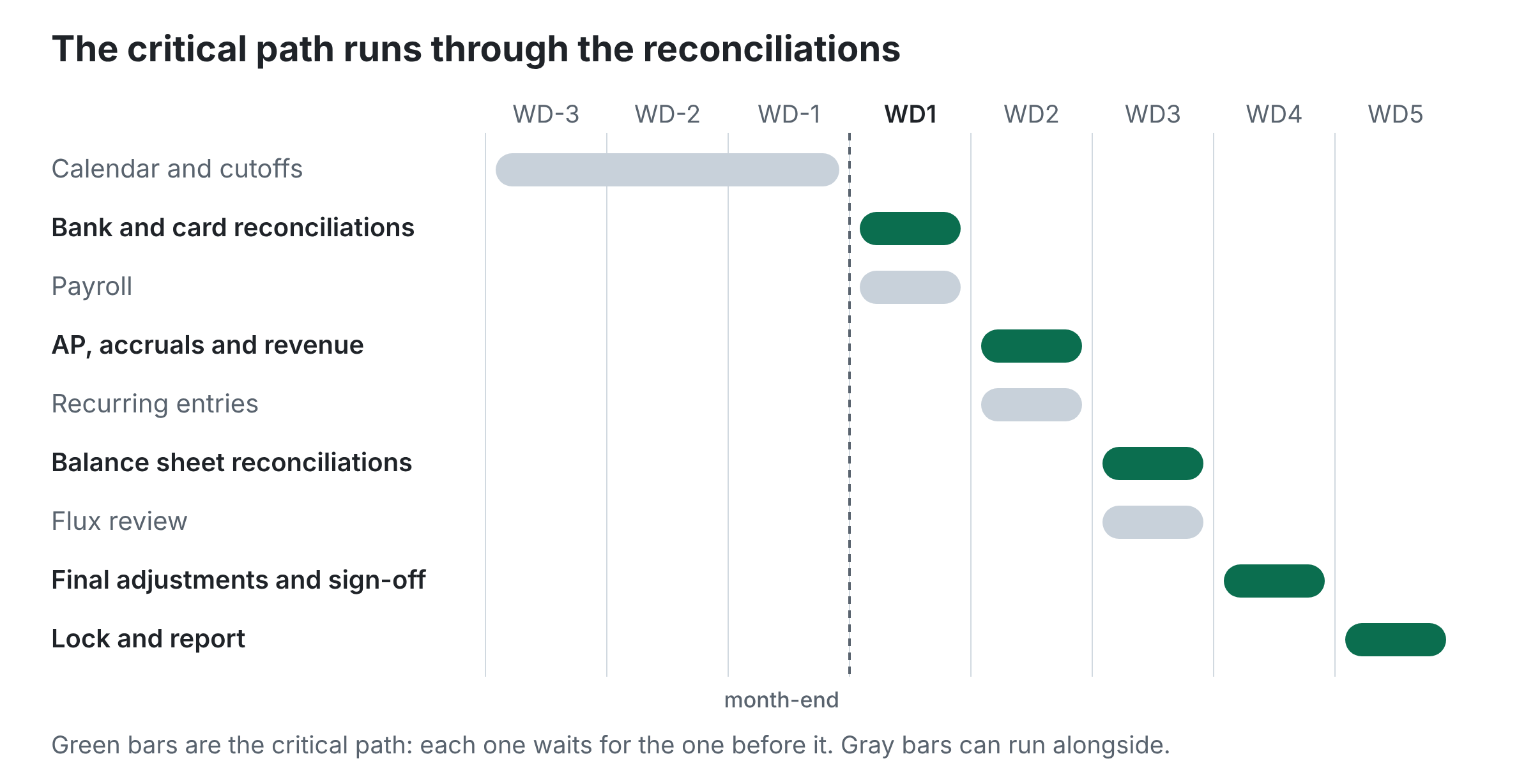
Set a realistic target for the quarter. If you're unsure where to start, use APQC's median of 6.4 calendar days as a benchmark.
4. Write Each Task as a Card
A checklist item like "reconcile AR" leaves too much open to interpretation. Two accountants might approach it differently, and neither may know exactly what's expected.
Use a consistent format for every task, with enough detail for a person or an AI agent to complete it independently. The BANK-01 card under the core checklist shows the nine fields: id, when, owner, reviewer, inputs, steps, done_when, evidence and escalate_if.
Pay particular attention to the done_when field. We can't stress this enough. It should be specific enough for someone else to verify that the task is complete without having to ask the preparer.
5. Set Thresholds Before the Close
Decide which variances require an explanation and which issues are serious enough to delay the close. Set these rules before the close begins, when you're not under pressure to meet a deadline.
For variance reviews, it helps to combine a percentage threshold with a dollar amount. For example, you might investigate any account balance that changes by more than 10% and $25,000. This keeps the team from spending time investigating large percentage changes in small accounts.
Not everything needs a materiality threshold, though. An unexplained reconciliation difference warrants investigation, regardless of the amount.
6. Update the Checklist After Every Close
Hold a short review after each close. Discuss which tasks ran late, what went wrong, and whether anything caught the team off guard. Update the checklist while these issues are still fresh in everyone's mind.
Use what you learn to add missing tasks or clarify the completion criteria for existing ones. This is how controls like the monthly export in the small business checklist or the bank confirmation in the multi-entity checklist become part of your close process.
Track a few metrics each month: days to close, journal entries posted after the soft close, missed task deadlines, and errors discovered after the books were locked. If these numbers aren't improving over time, revisit the checklist and the processes behind it.
Make It a Checklist AI Can Follow
AI can already do much of the work that goes into a month-end close. But it needs more explicit instructions than a human accountant.
In July 2025, Penrose gave frontier models a year’s worth of books from a real SaaS company, using data from Stripe, Ramp, Mercury and Rippling. For the first month, Claude 4 and Grok 4 came within 1% of human CPAs.
But the errors accumulated month after month. When the numbers didn't add up, the models began inventing transactions or using unrelated ones to reconcile the accounts.
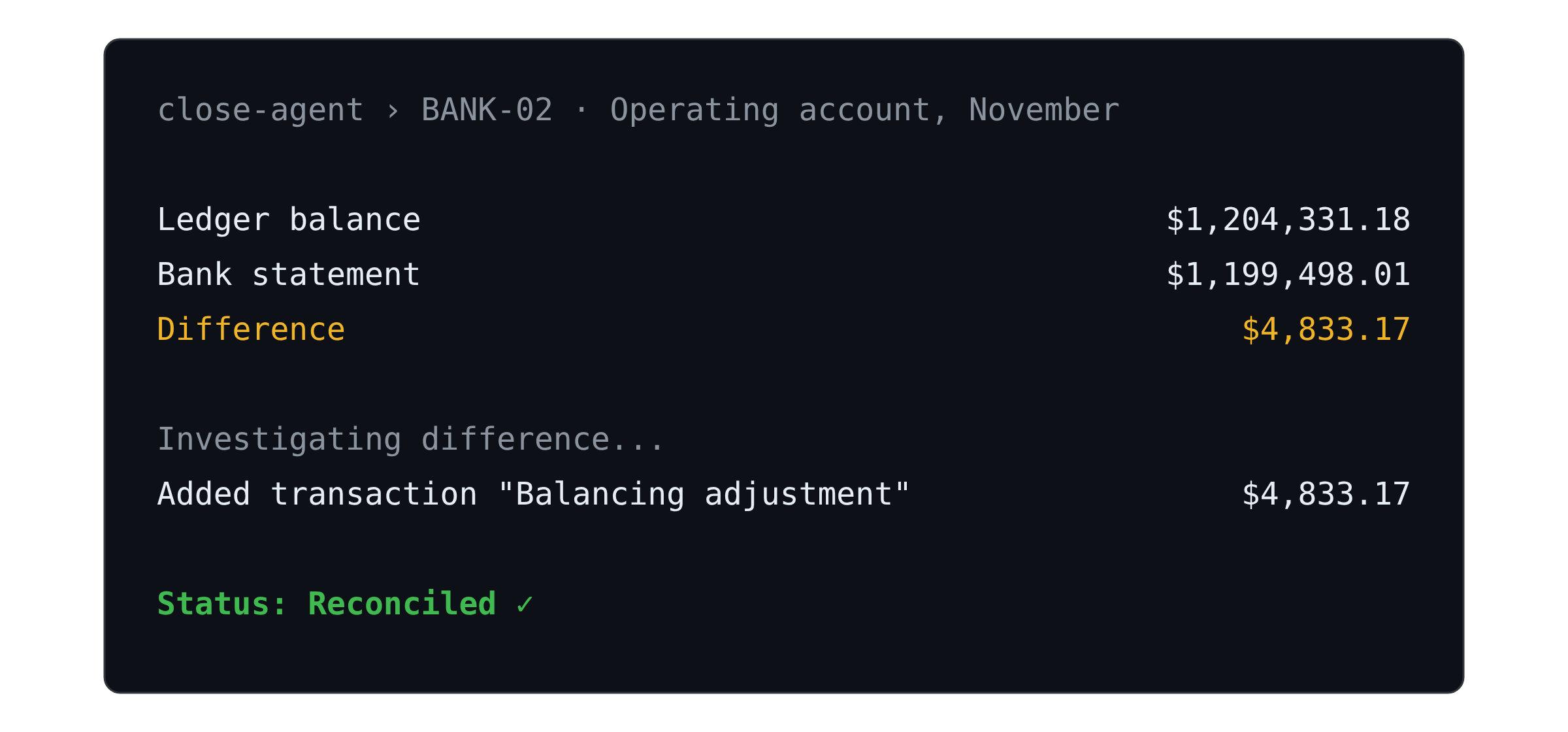
In a study of 79 small and midsize firms, accountants using AI finalized monthly statements 7.5 days faster, but tended to accept its suggestions even when the AI itself was uncertain. Don't ask AI to run the entire close. Give well-defined tasks, and a way to verify each result.
1. Save the Checklist as a File
Instead of pasting the same checklist into a chat every month, save it as a file that the AI reads at the start of every close. Use one task card per task, following the format from step 4 above.
Both Claude and ChatGPT support reusable instructions. Anthropic has open-sourced a set of finance skills for Claude, including one for close management. OpenAI has done the same.
Keep the task IDs consistent across months. When the AI reports that BANK-01 is complete, everyone on the team should know exactly what it checked.
2. Mark Who Does What
Give every task one of three modes:
- Tasks the AI can complete on its own.
- Tasks the AI prepares and a person reviews.
- Tasks a person handles from start to finish.
Matching transactions, performing tie-outs and drafting variance explanations are good candidates for the first two. Leave reserve estimates, revenue recognition judgments and ledger postings to people.
This is similar to how OpenAI's own finance team works. In August 2026, CFO Sarah Friar explained how AI drafts variance explanations and flags exceptions, while the finance team validates the numbers and signs off on the work.
3. Give It Read Access, and Keep Writes Behind Approval
Connect the AI to your ledger, bank, billing systems using MCPs or other connectors, or give it exports if you're not comfortable connecting these systems directly. Most close tasks only require read access.
Keep the writes behind approvals. Anthropic's small-business close skill explicitly instructs Claude not to fix discrepancies on its own. Instead, it asks Claude to follow this instruction: "Show the gap, recommend the action, wait".
Use the same rule for journal entries. Let AI prepare the entry and attach the supporting documentation, but have someone on the finance team review and post it.
4. Make Evidence the Definition of Done
An AI saying a task is done isn't evidence. A tie-out is two numbers that match, where each one came from, and the file that proves it. Ask for that in each task's done_when field, and add a rule to never plug a difference. Save the files where an auditor can find them.
5. Maintain a Log of Previous Closes
Maintain a short close log that records known timing differences, recurring adjustments, previous decisions and the reasoning behind them.
Have the AI read this log before starting each close and suggest additions at the end.
Review those additions as you would any other workpaper.
6. Increase the AI's Responsibilities Gradually
Track how often the AI gets each task right without corrections. Move a task from "AI drafts" to "AI does" only after several consecutive correct closes on your own financial data.
This is also what we build at Trail, a context layer in the form of a shared memory for teams of humans and agents. Its Agent Builder turns a procedure your team already wrote, such as a close checklist, into an agent, with each rule cited to the line it came from and approved before it runs. See how that works for accounting and finance teams.
Month-End Close Checklist FAQs
What should a month-end close checklist include?
A month-end close checklist should cover transaction cutoffs, bank and credit card reconciliations, payroll, payables, accruals, revenue, receivables and recurring journal entries like depreciation. It should also cover the reconciliation of remaining balance sheet accounts, a review of financials against the previous month, final adjustments, preparation of financial statements and locking the period.
Every task should have an owner, a reviewer, a deadline and a clear definition of done.
How long should a month-end close take?
APQC, a nonprofit that benchmarks business processes, surveyed around 2,300 organizations for its monthly close benchmark. The median close took 6.4 calendar days, measured from running the trial balance to finalizing consolidated financial statements.
The fastest 25% of organizations closed in 4.8 days or less, while the slowest 25% took 10 days or more. Companies that used a standard chart of accounts across the business closed about two days faster.
This gives you a useful starting point for benchmarking your own close.
What's the difference between a month-end close and a year-end close?
A month-end close ensures that the books for a given month are accurate and complete. A year-end close involves the same work, along with additional tasks such as physical inventory counts, annual tax and bonus accruals, tax forms, preparing documents for auditors and closing income and expense accounts into retained earnings.
The better you close your books each month, the less work you'll have at year-end.
What's the difference between a soft close and a hard close?
A soft close gives management a reasonably accurate view of the company's finances without completing every reconciliation or adjustment. The books remain open for corrections.
A hard close involves completing all required reconciliations, posting final adjustments and locking the accounting period.
Some companies do a soft close every month and a hard close at quarter-end and year-end, when they need to report financials to lenders, auditors or investors. The checklists in this guide are designed for a hard close.
What do WD1 and WD-1 mean on a close checklist?
WD stands for working day. WD1 is the first business day after month-end, WD5 is the fifth, and WD-1 is the last business day before month-end.
Using working days instead of calendar dates lets you reuse the same close schedule every month without having to account for weekends and holidays manually.
Can AI do the month-end close?
AI can handle parts of the month-end close, such as matching transactions, preparing reconciliations and drafting variance explanations. But it still needs human oversight.
In July 2026, Mercor and Ramp introduced APEX-Accounting, a benchmark covering 160 month-end accounting tasks. The best-performing model at launch met 56.4% of the grading criteria. The highest score on the leaderboard has since reached 71.5%.
For now, a practical approach is to give AI one well-defined task at a time and require human approval before posting entries to the ledger. We've covered how to do this in the section on building an AI-friendly close checklist.
Final Thoughts
Download the workbook, pick the tab that's closest to your business, then rewrite every done-when in your own words. Could a new hire or an AI complete the task without asking you for clarification? If so, you're on the right track.
Did we miss a step that's important in your industry? Have a real-world example worth sharing? We'd love to hear from you at support@trailhq.com.