
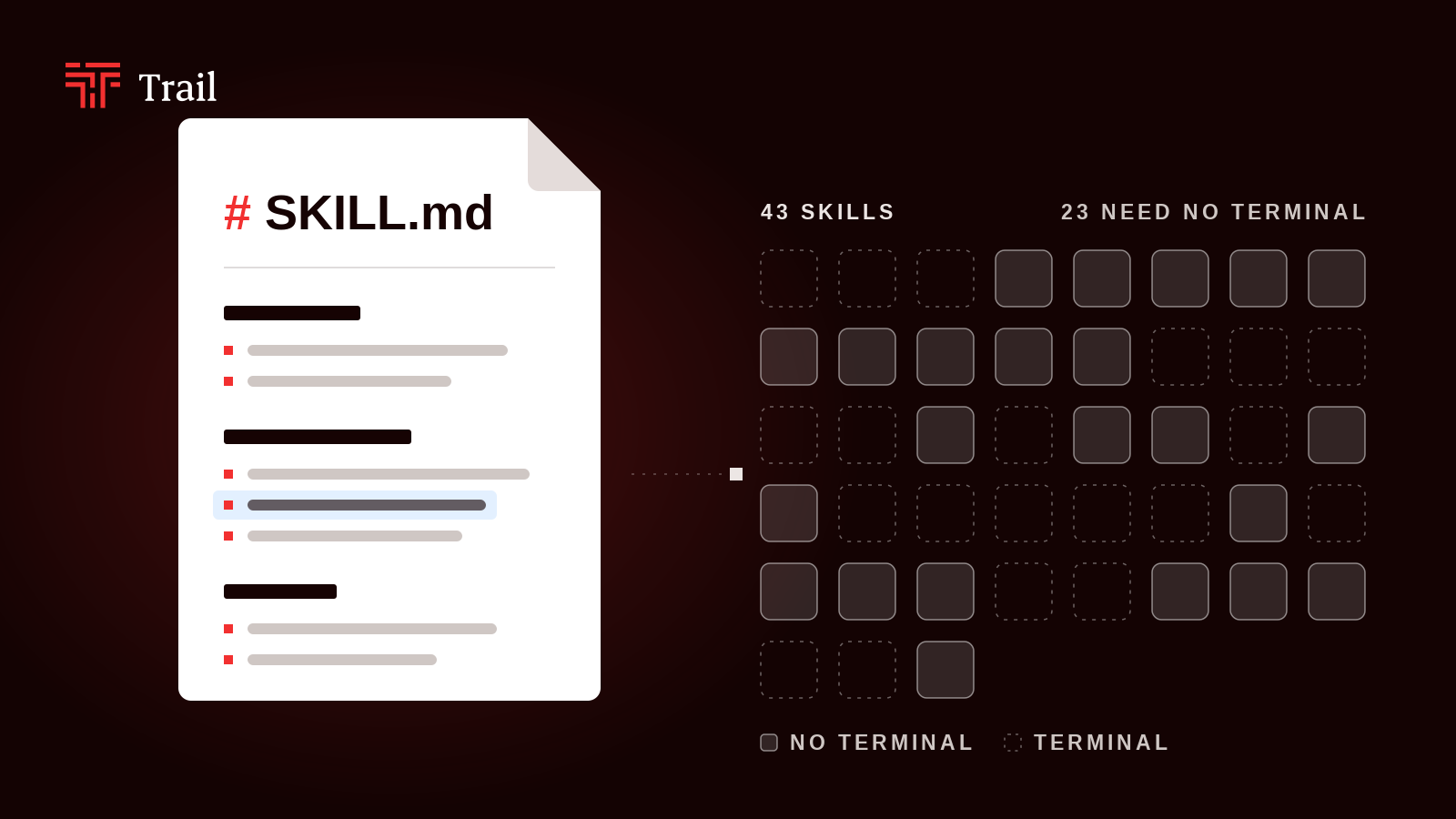
Most lists of the best Claude skills are aimed only at developers. A good number of them are also written by companies selling their own skills or products.
We put together 43 free skills that are worth exploring. For each, we briefly discuss what the skill does, why it's useful, and how you can start using it.
1. Startup Office Hours (gstack)
Thinking
Before you write any code, take your product idea to Claude and let it question you like an investor would. You might find that what looks like demand is just mild interest in reality, and you'll get this feedback fast so you don't waste your time.
Garry Tan, president and CEO of Y Combinator, published skills he uses with Claude Code. His gstack repository now has over 142,000 stars on GitHub. Most of gstack helps you ship software. But one skill, /office-hours, is designed to stop you from building too soon.
It asks six questions effectively: Is there real demand? How do people solve this problem today? Who needs it most? What's the smallest version worth building? What have you actually seen users do? And where is the market heading?
At the end, you get a design document with at least two possible approaches.
/office-hours is worth trying for the questions it forces you to answer.
Try it with a product idea you haven't validated yet. See how many of the six questions you can answer with evidence rather than assumptions.
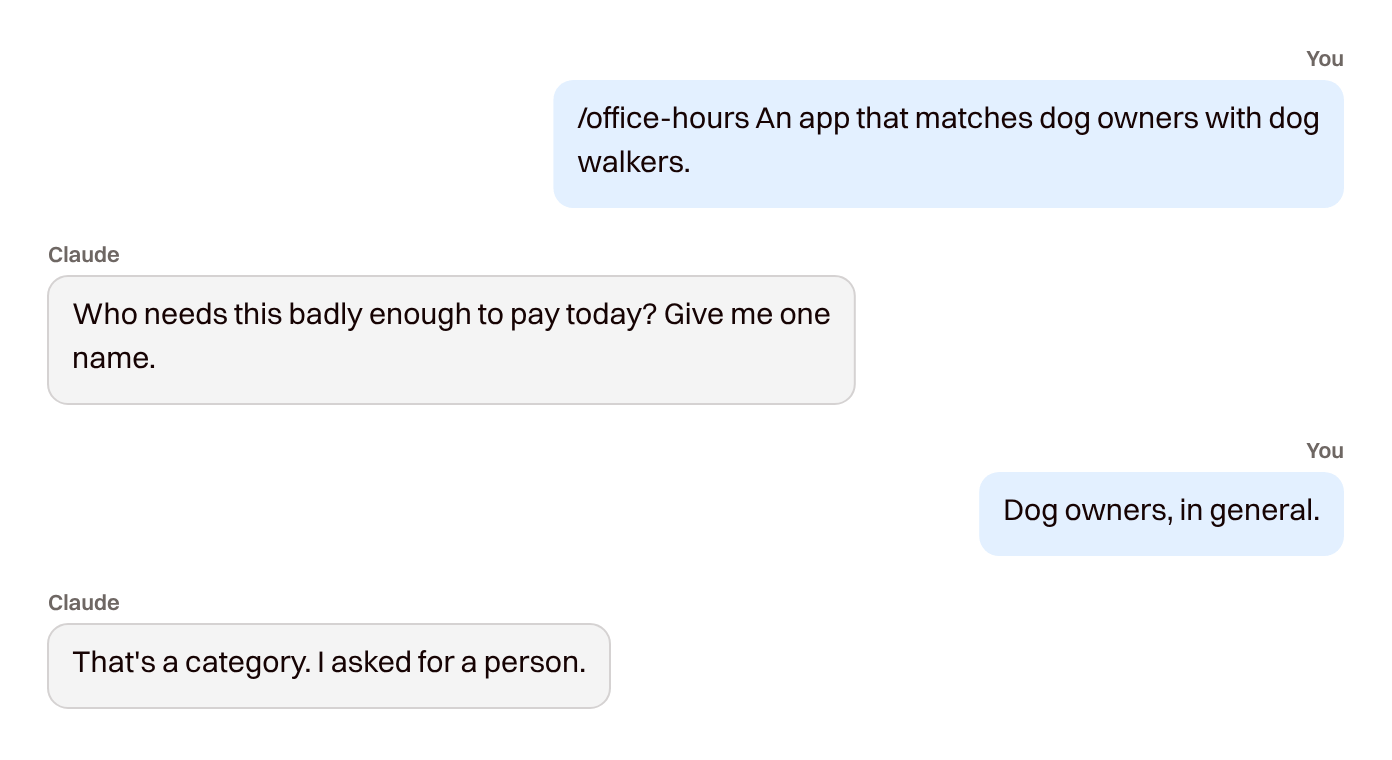
Read the gstack README, then the office-hours skill file. You'll need Claude Code. And then, a second skill, /plan-ceo-review, looks for a bigger version of the same plan.
2. Answers First (I Have ADHD)
Personal
Tired of Claude making you read three paragraphs before getting to the answer? This skill makes it lead with what you should do next.
Created by ayghri on GitHub, the skill draws loosely from The Adult ADHD Tool Kit by J. Russell Ramsay and Anthony L. Rostain. But you don't need ADHD to find it useful.
It has ten rulen, that effectively tell Claude to:
- Start with the next action.
- Number the steps if there's more than one.
- Keep lists to five items or fewer.
- Cut the preamble, recap, and sign-off.
Every reply also ends with a small task you can finish in under two minutes.
While the skill was built for coding agents, none of the ten rules is specific to coding. Perhaps that's why it caught on beyond developers. The GitHub repository now has 59k stars.
It isn't rigid, either. If you ask for a detailed explanation, Claude will give you one.
Try it for a day, even for questions that have nothing to do with code. Then turn it off and ask the same questions again. See which answers you'd rather read on a busy afternoon.
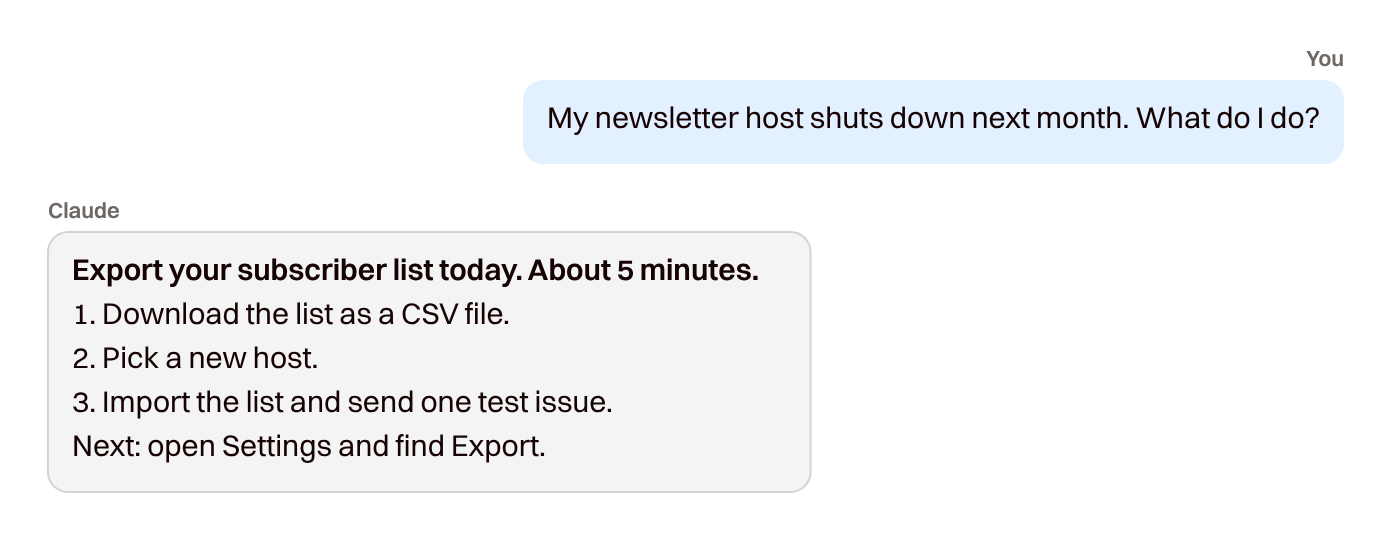
Read the i-have-adhd README for a before-and-after example, then the skill file for all ten rules. The skill installs as a plugin in Claude Code, and it stays on until you tell it to stop.
3. Distill a Coworker (Distilly)
Work
Imagine the only person who understands your company's billing system quits tomorrow. How much of what they know can you recover? That's the problem Distilly is trying to solve.
The project started as "Colleague Skill". Its problem statement was quite simple. When someone leaves a company or changes teams, much of what they know leaves with them.
Distilly tries to preserve some of that knowledge. Give it someone's chats, emails, and documents, and it creates two profiles.
- One that captures how they work.
- One that captures how they communicate and make decisions.
This idea has caught on. The GitHub repository has over 26,000 stars, and its public gallery had 215 skills. The project is now called Distilly.
Interestingly, its README never mentions getting the person's permission before building their profile, which is why I'd start with yourself. Distilly has a self-profiling mode.
Try it, and then read what it says about you. Does it capture how you work? What did it miss? And more importantly, is there anything in that file you wouldn't want a coworker to see?
Start with the Distilly README. If you're curious about the technical details, read the May 2026 research paper it references. You'll need a coding agent like Claude Code. And if you decide to try it on someone else's messages, ask them first.
4. Last 30 Days
Research
Ask what people have been saying about a topic over the past month, across Reddit, X, YouTube, Hacker News, and other platforms. Instead of relying on search rankings, you get a picture of what people are really discussing and upvoting.
The creator, mvanhorn on GitHub, built the skill to keep up with AI news. It searches multiple platforms in parallel, ranks results by engagement, and puts together a brief with citations.
The README describes the ranking as "scored by upvotes, likes, and real money." The money refers to Polymarket, where people bet on real-world outcomes.
Setup is fairly simple. Reddit, Hacker News, Polymarket, and GitHub work without API keys. X, TikTok, and Instagram require a login or API key.
First, try it with a topic you already follow closely. See whether the brief reflects what you've been reading, which sources it relies on, and whether it leaves anything out.
Check out the last30days README for setup instructions, including how to use it with the Claude web app. The repository has around 72,900 GitHub stars.
5. Posters and One-Pagers (Canvas Design)
Design and media
Ask Claude to design a poster or a one-page graphic, and it'll give you a finished PNG or PDF.
Its methodology is pretty interesting. It makes Claude invent an "art movement" first. It gives the movement a one- or two-word name, like "Brutalist Joy," then spends four to six paragraphs explaining its philosophy.
Only then can Claude start designing. Every choice has to follow that philosophy. Text should be minimal, and nothing should overlap or spill off the page. And then, Claude has to review the finished design and improve instead of adding new things (which is its natural tendency).
Try it with a poster for a real event, maybe an upcoming birthday or an event at work. Read the philosophy before looking at the design. See how well the two match. Then ask Claude to refine the poster.
You can find the canvas-design skill on GitHub. It's only 130 lines of instructions.
6. Grill Me
Thinking
Before you ask Claude to execute a plan, have it interview you about it.
You'll be surprised by how many decisions you were leaving to the model, and how much easier those decisions become when you tackle them one at a time. Over time, using the skill might even improve your ability to cowork with AI.
Matt Pocock's skills repository has over 329,000 GitHub stars, and grill-me is its most installed skill, which Pocock calls "just a few lines." It has three instructions:
- Interview me about every part of the plan until we both understand it.
- If the codebase can answer a question, look there instead of asking me.
- Recommend an answer for every question you ask.
That's it. Pocock says these interviews often last around 45 minutes for him.
The skill has 1.6 million installs on skills.sh. And it's not just for coding. Pocock used the same approach to figure out which course to build next. He simply removed the instruction about checking the codebase.
Try it with a decision you've been putting off. Paste those three instructions into Claude and describe what you're trying to decide. Pay attention to the questions you hadn't considered. You'll notice how often you accept Claude's recommended answer without giving it much thought.
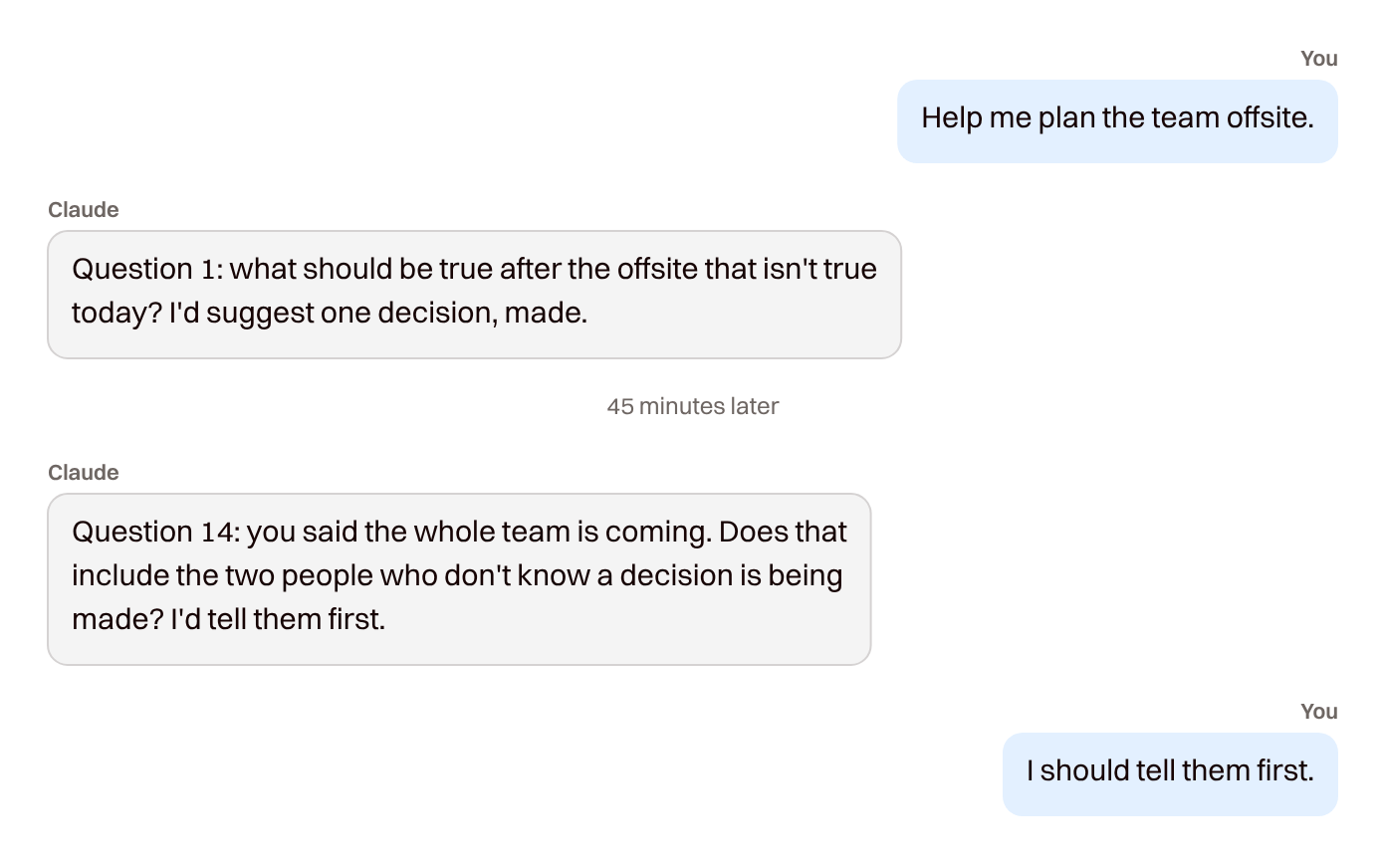
Read Pocock's post about the skill. And to install his complete set for a coding agent, run npx skills@latest add mattpocock/skills.
7. Humanizer
Writing
Give Claude a draft and ask it to remove the patterns that make AI writing easy to spot.
The skill has its roots in Wikipedia. In 2023, volunteer editors started cleaning up articles that sounded AI-generated, and thus, out of place. They eventually put together a guide called Signs of AI writing.
In January 2026, someone turned that guide into a Claude skill. It checks for 26 patterns, including the usual suspects like "not this, but that" constructions and one-line conclusions.
Note that the skill is meant to make writing better for human readers, not fool AI detectors. The README even admits that "detectors still flag most of its output". At the same time, it also cites a blind test where judges preferred the skill's rewrites in all 16 comparisons.
Try it on something Claude wrote for you last week. See which patterns come up most often. Then give it two or three paragraphs of your own writing and ask it to match your style. Compare the two rewrites. Does the second one sound more like you?
The Humanizer README has the full list of patterns, before-and-after examples, and installation instructions.
For more background, NPR's segment on the Wikipedia editors explains how the original guide came about.
8. Frontend Design (that doesn't look like slop)
Design and media
Most websites Claude builds look the same. This skill tries to change that.
The story behind this is interesting. In Nov 2025, three members of Anthropic's Applied AI team explained why Claude kept producing similar-looking websites. Models tend to pick what's statistically most likely, and the web is full of safe, familiar design choices.
They called this "distributional convergence." Their first fix was small, a skill of about 400 tokens that told Claude what to avoid. Specifically, the Inter font and purple gradients on white backgrounds.
But we know today that the defaults didn't stay the same. The skill in the repository today doesn't mention Inter or purple. Instead, it warns against cream backgrounds, serif headlines, and terracotta accents. It even calls terracotta "Anthropic's own accent."
The original post about the skill had anticipated this way back when it was first released. It had pointed out that when Claude is told to avoid one overused font, it often just picks another default. And that's the problem with banning defaults, Claude just finds new ones and the skill has to keep up.
Try building the same landing page twice: once with the skill and once without. Also look through the skill's list of design choices to avoid. How many of them can you spot on your own website?
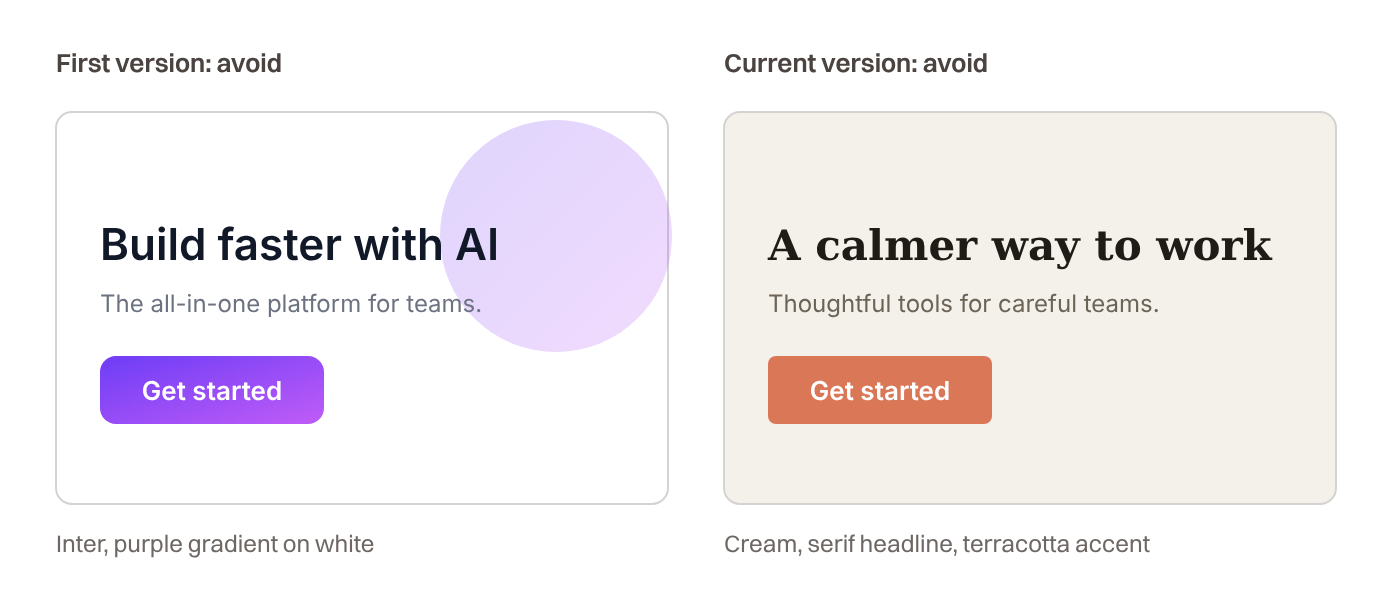
Read Anthropic's 2025 post on the skill for the reasoning and the before-and-after images, then the current skill file.
9. Co-Writing a Document (Doc Co-Authoring)
Writing
Try writing your next proposal, spec, or decision document with Claude in three stages instead of giving it one big prompt:
- Get everything out of your head. Claude starts with five questions, including who the document is for and what you want readers to do after reading it. You share everything you know, and Claude follows up with few questions about what's missing.
- You build the document section by section. Claude suggests up to 20 points for each section. You decide what stays, what goes, and what can be combined.
- "Reader testing". Claude comes up with questions a real reader might have. Then a fresh Claude session, with none of the context from your conversation, reads the finished document and tries to answer them. If it gets something wrong, you've probably left something out, maybe something that was obvious to you but not to others.
You can actually try this with a document you've already written. Give it to a fresh Claude session and ask three questions someone unfamiliar with the topic might ask. See what it gets wrong. You might be surprised by how much you've left unsaid.
The full process is in Anthropic's doc-coauthoring skill. It's 375 lines long, but worth reading.
10. Training Plans (Claude Coach)
Personal
Get a marathon or triathlon training plan based on workouts you've done. You'll get a personalized training plan, and see how much Claude can learn from your workout history.
Felix Rieseberg, who works at Anthropic, built Claude Coach as a personal project.
It starts with your training data. If you use Strava, it can pull in your entire activity history. Otherwise, you can export your history manually from an app, or simply enter your weekly training hours, longest workouts, and past race times.
Next, Claude interviews you. How long have you been training? What races have you completed? Any injuries? Which days are off-limits?
The whole process takes about 15 minutes. You get a small app where you can reschedule workouts, edit sessions, and track what you've completed. You can also export your plan to a calendar, Zwift, or a Garmin watch.
Try it with a target at least three months away. Look at the first two weeks. Does the plan reflect how you train? Did Claude ask anything you'd never see in a generic training plan?
The Claude Coach README walks through setup. The project has around 200 GitHub stars and supports endurance sports only. It isn't a substitute for medical advice, so check with a doctor before making major increases to your training load.
11. Socratic Tutor
Thinking
Pick something you want to learn, and Claude will quiz you until you can explain it without help.
Jane Street, the trading firm, published this skill in November 2026. It caught quite a bit of attention, with more than 700 points on Hacker News.
Claude breaks your topic into four to ten smaller skills. It starts with a few questions to figure out what you already know, then builds a skill map. Each skill gets a score from 0 to 5. At level 4, you can work independently. At level 5, you know it well enough to teach someone else.
From there, Claude mostly asks questions. Get something wrong, and it won't immediately tell you the answer. Instead, it asks an easier, more specific question to help you work it out. If you're still stuck after two or three tries, it explains.
It also brings back earlier topics without warning to check whether you've retained them. Get one wrong, and your score drops.
There is one catch though. Claude doesn't remember your progress between sessions. You need to say "save state" before leaving and paste the saved state into your next chat.
Try it with a topic you think you know well. See how far you get before the questions expose a gap. And don't expect praise for every correct answer. The instructions explicitly tell Claude not to flatter you.
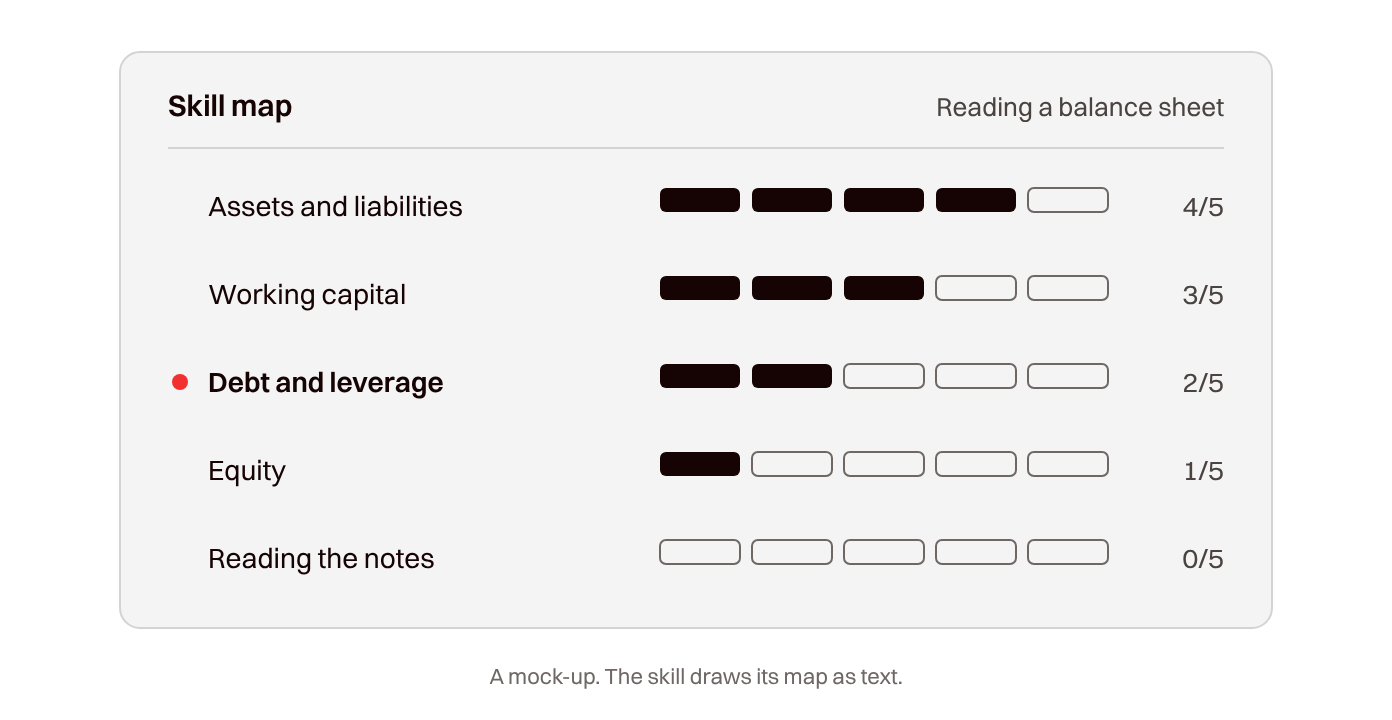
You can read the skill file, install it as a skill, or simply paste it into a chat. If you'd rather have Claude write lessons for you instead of quizzing you, try Teach.
12. Workplace Memory (Productivity Plugin)
Work
Teach Claude about your coworkers, projects, internal acronyms, and let it remember them.
The memory here is simple plain text. You can open it, edit it, and see exactly what Claude knows about your team.
Anthropic's README uses this example: "ask todd to do the PSR for oracle." That means nothing to someone outside the company. But once Claude has the team's context, it knows Todd is Todd Martinez, the finance lead, PSR means Pipeline Status Report, Oracle refers to the Oracle Systems deal.
All of this lives in files. CLAUDE.md holds the working memory, memory/ stores additional context, and TASKS.md tracks tasks. You can open these files anytime, check what Claude has remembered, and remove anything that's wrong.
To try it, install the skill, run /start, then give Claude a task the way you'd ask a coworker. Did it remember the right things?
The productivity plugin's README is a good starting point. It's one of 11 plugins Anthropic released in January 2026, and you can install it from claude.com/plugins.
13. Status Updates (Internal Comms)
Writing
Ask Claude to write your weekly update, team newsletter, or FAQ answer in your company's usual format. This skill hardly needs any instructions when you give it good examples.
- Writing a 3P update (Progress, Plans, Problems)? There's an example for that.
- Newsletters and FAQ answers have their own examples.
- Anything else goes to a general template.
If none of the formats fit, Claude asks you which one to use. That's pretty much the whole skill. The description says it writes in "the formats that my company likes to use." But the included examples come from Anthropic, so naturally, they reflect how Anthropic writes.
Replace those examples with your own, and the skill starts writing more like your team. Try it with your next few updates. Swap the 3P example for three of your best updates from the past year and run it again.
Read Anthropic's internal-comms skill file and check out the examples folder next to it. The skill itself takes a minute to read. Most of what makes it work lives in the examples.
14. Code Review
Code
Have four agents review a PR, but only report bugs they're confident about. That's the idea behind this plugin from Anthropic. Its README credits Boris Cherny as the author.
The four agents work in parallel.
- Two check the code against your project's rules.
- One looks for obvious bugs
- One reads the code's history to understand the context.
Every finding gets a confidence score from 0 to 100. Anything below 80 gets thrown out. The filter is meant to weed out existing issues, nitpicks, linter warnings, and things that look like bugs but aren't. It also skips draft PRs, closed PRs, and trivial changes.
If nothing passes the threshold, it says nothing, and I think that's the most useful idea here. A reviewer that keeps raising false alarms is bound to eventually get ignored even when it finds something real.
Pick a PR you've already reviewed and run the plugin. Did it catch anything you missed? Then lower the threshold to 50 and run it again. See how much of the extra feedback is actually worth your time.
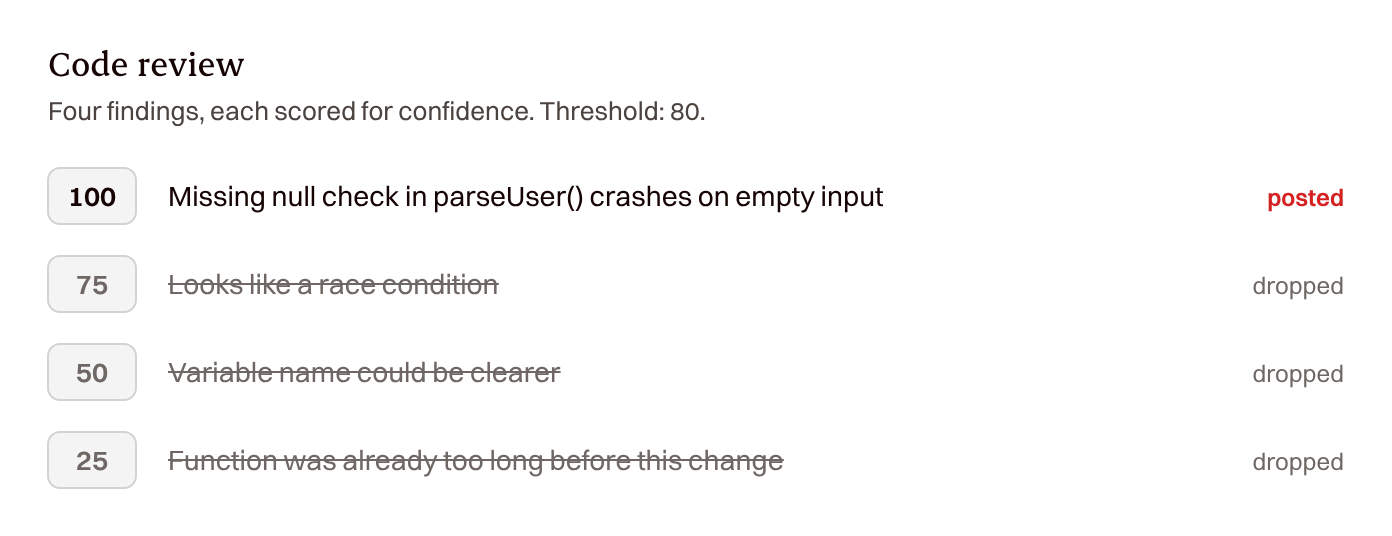
Read the plugin's README. It needs Claude Code and GitHub's command-line tool, and it admits to being slow on large changes.
15. Deliberate Practice (Learning Opportunities)
Thinking
Let a coding agent do its work, then make it check whether you understood what it did.
Reading a good explanation can feel like learning. But understanding something well enough to explain it yourself is a different matter.
Cat Hicks, a psychological scientist who studies software teams, worries that coding agents make it too easy to "skip the active processing that builds understanding". She built a Claude skill to address this.
After Claude finishes a meaningful piece of work, like shipping a feature or refactoring code, it offers a 10–15 minute learning exercise.
The exercises draw on research into how people learn. Claude might ask you to predict what some code will do before running it, explain how it works in your own words, or recall something you worked on earlier.
The skill knows when to leave you alone, too. Decline an exercise once, or complete two, and it won't interrupt you again that session.
Accept one exercise and try it. Can you predict what the code will do? Can you explain why it works without looking at Claude's explanation? You might find a gap between what you thought you understood and what you actually understood.
The learning-opportunities README links to the research behind the skill and its exercises. The project is aimed at developers who use coding agents and went viral on Hacker News.
16. Web Slides (Frontend Slides)
Design and media
Ask a coding agent to make a slide deck, and it'll give you a single HTML file you can open in any browser. And the way this skill helps you choose a design is quite unorthodox.
Most people know what they like when they see it, but struggle to describe it, especially when the subject is taste. So instead of asking you to explain what you want, the skill generates three previews and asks you to pick one.
Each preview takes a different approach.
- First one uses a set of 12 safe presets
- Second one tries a bolder template
- Third one is a wildcard
The skill comes from zarazhangrui on GitHub, where the repository has around 31,700 stars.
The output is deliberately simple. Every deck is a single HTML file with all its CSS and JavaScript included. So there are no dependencies and no setup. You can also use the skill to convert an existing PowerPoint deck.
Try it with a presentation you've already given. Let the skill generate three previews before telling it what you want. See which one you pick, and ask yourself how you can formally describe that design beforehand.
Check out the Frontend Slides README.
17. Agent Swarms (Orchestrating Swarms)
Code
Agent swarms have given impressive results on long-running difficult tasks. The point is that a big task doesn't always need one agent working through it from start to finish. You can split the work across a team of agents, with a lead coordinating who does what.
Claude Code calls these agent teams. Each teammate runs as a separate Claude instance with its own context, but they all work from a shared task list. Kieran Klaassen, co-maintainer of Every's Compound Engineering plugin, wrote a skill explaining how to use them. It covers six ways to organize a team:
- Parallel specialists: Give different parts of a task to different agents.
- Pipeline: Have agents work in sequence, passing results to the next.
- Worker swarm: Let agents pick tasks from a shared pool.
- Research, then build: Have one team investigate before another starts coding.
- Plan approval: Require an agent to get its plan approved before making changes.
- File ownership: Give each agent its own files to avoid conflicts during refactoring.
In February 2026, Anthropic researcher Nicholas Carlini had 16 Claude agents build a C compiler. Across nearly 2,000 sessions and just under $20,000 in costs, they produced a compiler capable of building Linux.
Interestingly, there was no lead agent here. Instead, each agent picked its own task and used a lock file to make sure nobody else was working on it.
Agent teams are still experimental and disabled by default. They might also incur high token costs. Klaassen also tested his skill against a January 2026 version of Claude Code, so some tool names have since changed. His skill is useful for understanding the patterns, but explore yourself whether you want to follow his skill or Anthropic's documentation for setup.
If you're trying agent teams for the first time, Anthropic recommends starting with three to five teammates. More agents also mean more tokens, so there's a cost to adding them.
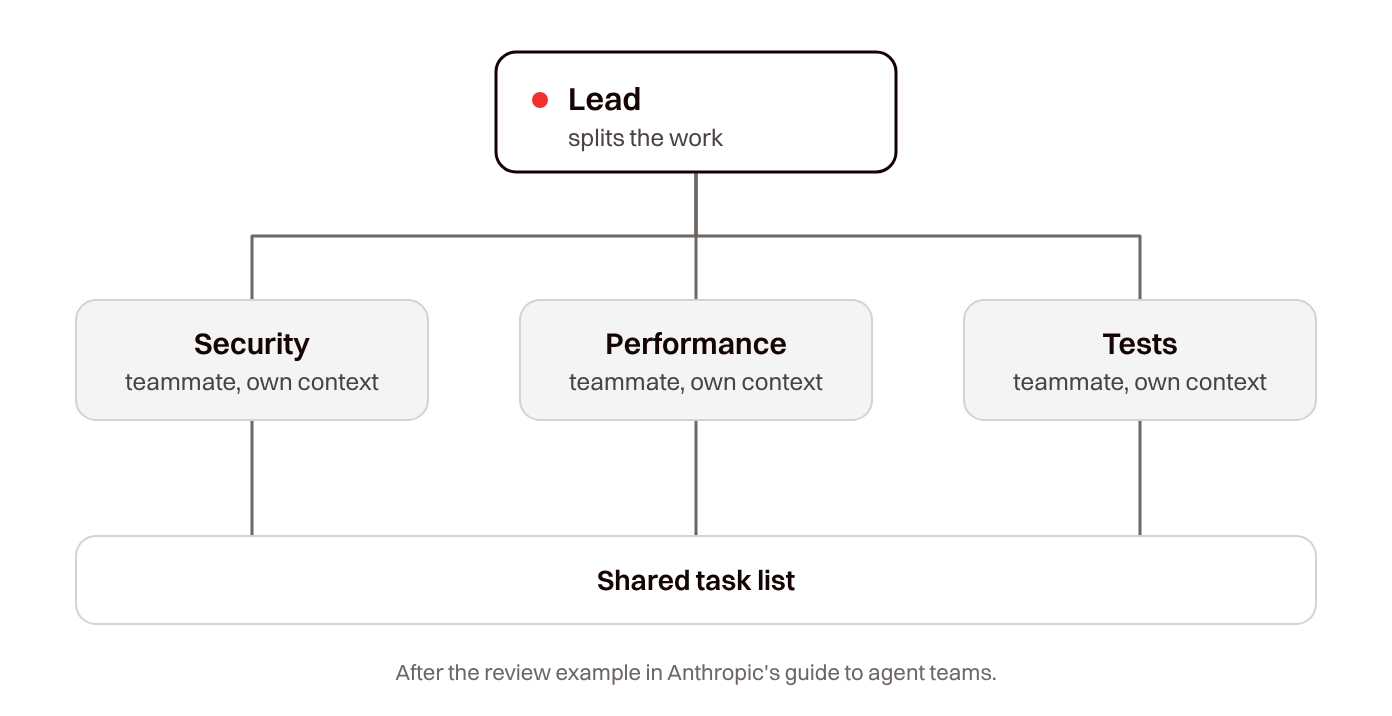
Read Klaassen's skill and Anthropic's agent teams guide. Another must-read is Carlini's write-up on building a C compiler using agent swarms.
18. Points and Miles (Travel Hacking Toolkit)
Personal
This one started with a common problem. Every time you book a trip with points, you ask yourself whether you should pay with points or cash?
Answering it means checking award availability, cash fares, your points balances, and transfer rates across loyalty programs. That's a lot of tabs. Borski, who books most trips with points and miles, built a Claude Code toolkit to do the legwork.
It started with 7 skills and has grown to 42. It can search award seats across 25+ mileage programs, compare cash fares, find hotels and ferries, and check your points balances.
Not everything is free though. Cash fare and hotel searches are free, but award searches require a paid Seats.aero subscription, and balance tracking needs a paid AwardWallet account. Some skills also use your creds to log in to airline and credit card websites.
To see how well it works, give Claude a trip you've already researched yourself. See if it finds a cheaper fare or a transfer partner you overlooked.
The Travel Hacking Toolkit has around 800 GitHub stars. You can install it as a Claude Code plugin, and the setup script helps you configure the API keys.
19. Prompts for Other AI Tools (Prompt Master)
Writing
Tell Claude what you want to do in Midjourney, Cursor, or ChatGPT, and it will write a prompt for you. The skill was built by a developer called nidhinjs, who shared it on Reddit as a way to write better prompts for different AI tools. The GitHub repo now has around 16,000 stars.
It starts by identifying which AI tool you're using, since a good prompt for Midjourney won't necessarily work well in Cursor. It then checks your request for nine things, including the output you want, any constraints, and what a good result would look like.
If you're missing something important, it asks you to clarify by asking three questions or less. You get one prompt you can copy and paste, along with a short explanation of why it's structured that way.
The skill also has some strong opinions about what doesn't work. It avoids techniques Tree of Thought and prompt chaining, which the README calls unpredictable. There's also a list of 37 common prompting mistakes that waste credits, with examples of how to fix each one.
Test it by taking a prompt that didn't work well for you, running it through the skill, and comparing results. See what it adds or changes.
You can find it in the Prompt Master README. To install it, download the GitHub repo as a ZIP and upload it to Claude under Customize > Skills.
20. Teach
Thinking
Learn something over several sessions, with Claude remembering what you've learned and where you left off.
Another skill from Matt Pocock, this skill has about 1 million installs on skills.sh. It works inside a folder on your computer. It starts with a MISSION.md file that explains why you want to learn the subject. From there, it creates short lessons as web pages, each covering one idea.
After each session, the skill records what you've learned, where you struggled, and what you should tackle next. It uses those notes to plan future lessons. That's what makes it different from asking a chatbot to explain a topic.
You don't have to start from scratch each time. The skill knows what you've already covered. And it isn't limited to programming. You can use it to learn almost anything.
Try it with something you've been putting off learning. After the first lesson, check MISSION.md. Does it capture why you want to learn? Then get learning.
Read the teach skill on skills.sh. You'll need a coding agent like Claude Code since the skill works with files on your computer. Pocock's README barely describes it, so the skill file itself is the best place if you want to understand how it works.
21. Investment Thesis (Thesis Tracker)
Personal
Write down why you bought a stock, or why you're thinking of buying one. Then let Claude check whether new information still supports your reasoning.
If you can't say what would prove you wrong, you don't have much of an investment thesis. While Anthropic has a collection of plugins for banks and investment firms, many rely on paid data feeds. This one needs only what you give it. The entire skill is 67 lines long.
You start with a thesis in one or two sentences. Then list three to five reasons it should hold, three to five risks that could prove you wrong, the events worth watching, a target price, and when you'd sell.
As new info comes in, Claude logs it against your thesis. Does it strengthen your argument, weaken it, or change nothing? The skill also asks Claude to look for evidence against your position, not just evidence that confirms it.
It recommends reviewing at least once a quarter. It will help you review why you think favorably about a stock, and whether those reasons still hold.
Read Anthropic's thesis-tracker skill and the repository README. The skill comes with the equity research plugin. Anthropic makes clear that these tools are built for professionals and aren't investment advice.
22. Small Business Back Office (Small Business Plugin)
Work
Do you run a small setup, like a six-person company? If yes, it is likely that you're the CEO, finance team, sales team, and the person writing job ads.
Which job would you want to hand off first? Anthropic's small business plugin gives you 44 skills to choose from. Twelve handle finance, eight handle sales, eight handle marketing, and the rest cover customers, hiring, inventory, setup.
Just ask a question to try it. "Who owes me money?" works. So does "I'm stressed about payroll." A router figures out which skill to use. Then, these skills run multi-step workflows, but each step needs your approval. For instance, the plugin can prepare payroll, but it won't pay anyone without your say-so. Same goes for sending messages or publishing anything.
It also has simple rules to prevent hallucination. If it can't read a number, it tells you instead of making one up.
Setup takes about 15 minutes. Read the small business plugin's README for all 44 skills.
23. Superpowers
Code
Make your coding agent think before it writes code: brainstorm, plan, test, review. You'll learn how to write instructions that agents follow even when they have tendencies to skip them.
Superpowers is hard to miss. It shows up on plenty of lists, and its GitHub repository has over 320k stars. Jesse Vincent, its creator, wanted to see whether Claude would follow a skill even when it had reasons to skip it.
He started with easy tests where Claude quizzed its subagents like contestants on a "gameshow," and they got every answer right. So he made the tests harder.
In one, production is down and every minute costs $5k. The agent can start debugging immediately or spend two min reading the debugging skill first. In another, the agent has spent 45 min writing code. Does it stop to read a skill that might force it to redo work?
Vincent also borrowed ideas from Robert Cialdini's Influence. It turns out that persuasion techniques designed for humans work on Claude too.
These experiments shaped Superpowers into a set of skills that leave little room for excuses. The brainstorming skill, for example, won't let the agent write a single line of code until you've approved the design.
Try it with a small feature. Count how many questions the agent asks before writing code. Then open one of the skills and look for the excuses it's written to prevent.
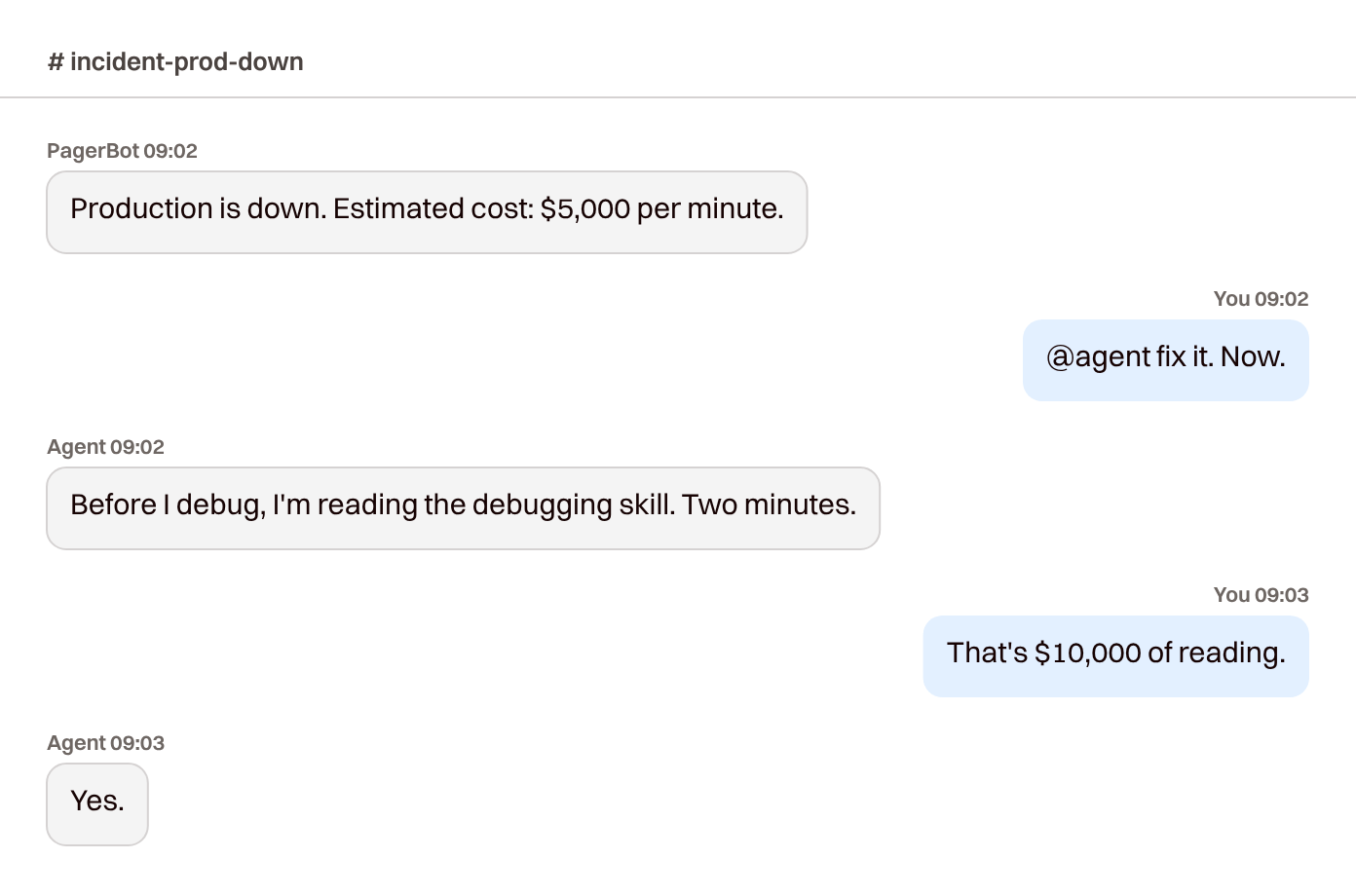
Read Vincent's 2025 post introducing Superpowers, then the README for the current workflow. The post describes the first version, and the install steps have changed since. You'll need Claude Code or another coding agent.
24. A Skill That Improves Your Skills (Task Observer)
Work
Let Claude watch how you work, note what you keep correcting, and suggest changes to your skills.
Eoghan Henn built Task Observer to solve a couple of problems. Firstly, writing skills takes time, and secondly, once written, those skills don't improve based on how you use them.
Task Observer runs in the background and keeps track of things like corrections you make, tasks you repeat manually, and gaps in how a skill works. It saves each observation as a separate file. After a week, you review notes and turn them into proposed skill updates.
Nothing changes without your approval. As the README says, "Nothing touches a skill until you approve it."
Henn has tested it on his own 87 skills, collecting more than 2000 observations. The project now has over 100 contributors and 3900 GitHub stars.
Henn notes that the full workflow makes the most sense if you have lots of skills and use them regularly. A good way to test it is to let it run for a week while you work as usual. Then go through the observations and see which corrections keep coming up.
You can find the setup instructions in the README and user guide. It works best when Claude can save files to a folder.
25. Tax Returns (Tax Filing)
Personal
Give Claude a folder of tax documents, and it'll fill out your tax forms and tell you what to double-check.
A developer named robbalian on GitHub used Claude Code to prepare two years of U.S. tax returns, for 2024 and 2025. Both times, the numbers matched TurboTax. But getting there took some work. The first return took nearly an hour, with plenty of back-and-forth prompting and trouble filling out PDF forms.
Once it worked, the author asked Claude to turn everything it had learned into a reusable skill. That included small details, like which type of PDF form field to look for first.
This is actually a useful approach to building skills of your own: do the job once, figure out what went wrong, then write down what you'd want to know before doing it again.
The skill explicitly tells Claude to look up the current year's tax brackets and deductions instead of relying on what it remembers.
A good way to test it is with a return you've already filed. Give Claude the same documents and compare the results. Do the numbers match perfectly?
Read the author's Hacker News post and the skill's README.
The skill supports U.S. federal and state returns, and you can install it by uploading a ZIP. Just don't submit its output without a proper check first.
26. Job Search (Career-Ops)
Research
Have an agent go through job listings, compare them with your CV, and tell you which ones are worth applying to. The idea with this skill is to use AI to apply to fewer jobs, not more.
Santiago Fernández de Valderrama built this system for his own job search before releasing it publicly. According to his repository, it evaluated over 740 listings, generated more than 100 tailored CVs, and helped him land a job as Head of Applied AI.
That's 740 listings he didn't have to read himself. For each listing, the agent writes a report and gives it a score out of 5. The README recommends skipping anything below 4.0.
It also has a few guardrails. It won't submit applications for you, and the README explicitly says, "Always review before submitting."
The workflow is straightforward. It scans job boards, scores listings against your CV, and prepares a tailored CV for jobs you want to pursue. You decide where to apply and when.
If you're on the hunt, try it with three jobs you're already considering. See if the scores match your own judgment.
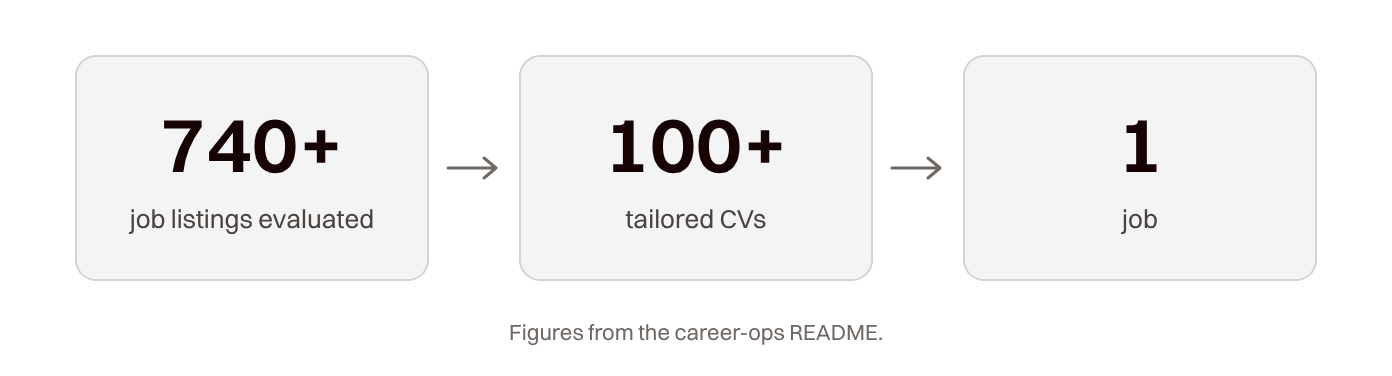
Read the career-ops README, which has 69k stars. It explains the scoring and the setup.
27. Ralph Wiggum
Code
What happens if you give a coding agent the same prompt every time it tries to stop? Turns out, you can get surprisingly far with a simple loop.
Geoffrey Huntley introduced this approach in July 2025. He calls it Ralph, and describes it in five words: "Ralph is a Bash loop."
That's literally what it is. A one-line loop feeds a prompt file to an agent, waits for it to finish, then runs it again. The prompt stays the same, but the code changes with each run.
Anthropic later turned the idea into a Claude Code plugin, named after Ralph Wiggum from The Simpsons. Instead of a Bash loop, it uses a hook to catch Claude when it tries to exit and sends it back to work. You can set max_iterations and a completion phrase to tell it when to stop.
And people have reported some impressive results. The plugin's README mentions a $50,000 contract completed with just $297 in API costs.
But there's a catch. Huntley warns that the approach needs a senior engineer to steer it and works better for new projects than existing codebases. Ralph works best when success is easy to verify, like getting a test suite to pass. It's a poor fit for tasks that require judgment.
Try it with a small yet notorious coding task that has clear tests. Limit it to ten iterations and watch what happens. Does the agent actually make progress with each round? Does it know when to stop, or does it just keep going?
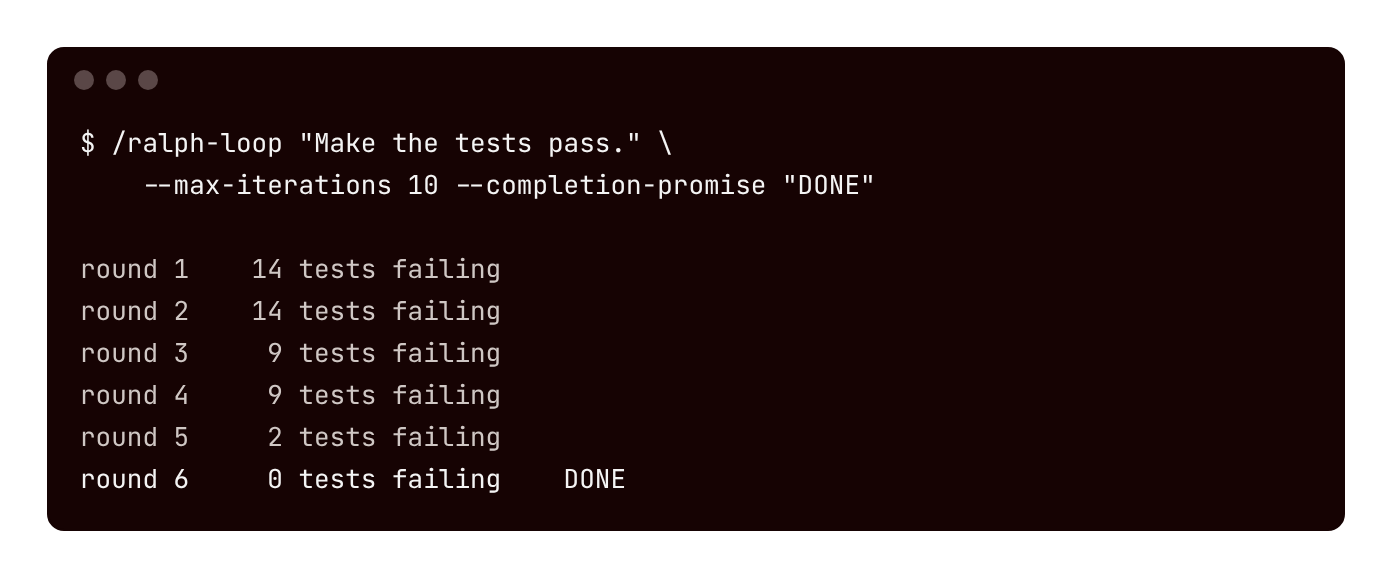
Read Huntley's 2025 post, then the plugin's README. The dollar figures come from other people's accounts, so they are real user stories.
28. Video From Prompts (Remotion)
Design and media
Describe a short video and ask a coding agent to build it in Remotion. You'll see that to make a video from a prompt, a lot of the work is in getting the details right.
Remotion's product lets you make these videos with code. In January 2026, its creator, Jonny Burger, released a set of skills to help coding agents use it. To announce them, he shared a video made with Claude Code. He also published the entire coding session, so you can see how it was made. It took about 35 prompts.
The first prompt asked for a terminal window on a 1,280-pixel-wide canvas. Almost everything after that was a correction. The fonts were too small. He had to point that out more than once. A 20-degree rotation looked wrong, so he changed it to 10. Claude even broke its own code at one point and had to fix it.
So while the agent wrote all the code, Burger still had to make the creative decisions.
Try it yourself. Ask a coding agent to make a five-second title card. Count how many prompts it takes to get something you're happy with.
Start with Burger's published Claude Code session from January 2026. Then check Remotion's skills documentation for installation instructions.
You'll need a coding agent and a terminal.
29. Lessons From Lenny's Podcast (Lenny Skills)
Work
Ask Claude for help with a roadmap, a hiring decision, or a product strategy, and get advice drawn from hundreds of interviews with people who've done it before.
Before becoming a full-time creator, Lenny Rachitsky spent seven years at Airbnb working on supply growth, conversion, trip quality, and community. In January 2026, he made his podcast transcripts publicly available. Sid Bharath and his team at Refound, an AI consultancy, decided to turn them into skills.
Their first attempt didn't go well. They asked a model to extract every named framework from 297 transcripts. It ran overnight, cost about $50, and returned 3,163 frameworks. Most had been mentioned by just one guest. There was too much to make sense of.
So instead of organizing the advice around frameworks, they reorganized it specifically around tasks people do frequently, like writing a PRD. Then they pulled together what different guests had said about each task.
The latest version has 76 skills drawn from 597 podcast episodes and newsletter posts. The team checked every quote against the original source, and each skill links back to the episodes it draws from.
Try it with a decision you're facing at work this week. And follow a source link or two to see where the advice comes from.
You could also build your own skill similarly using transcripts from a creator whose judgment you trust.
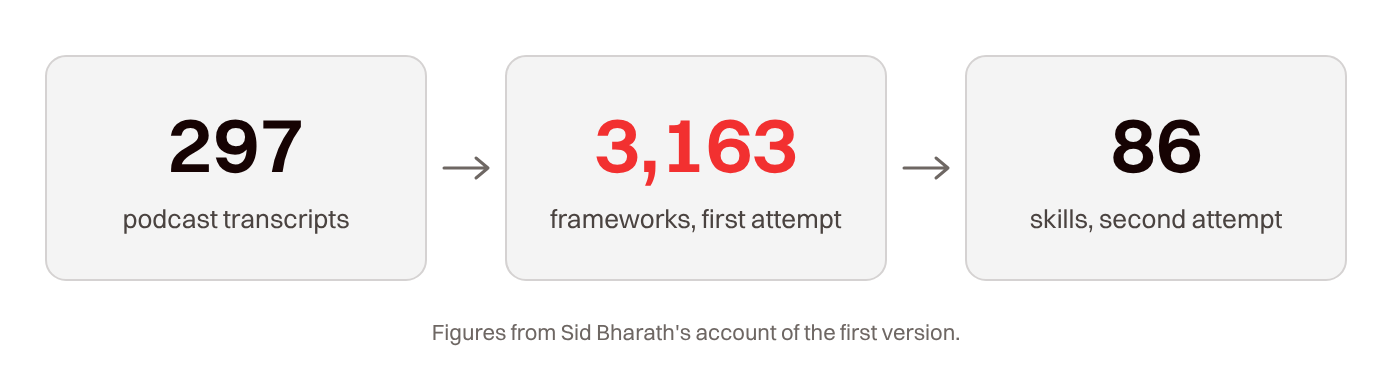
Read Bharath's account of building it, then browse the skills at refoundai.com/lenny-skills. To install all of them, run npx skills add RefoundAI/lenny-skills.
30. Interview Practice (Interview Coach)
Personal
Noam Segal, who leads community research at Lenny's Newsletter, interviewed more than 30 people in tech for a February 2026 article on using AI during a job search.
He noticed that the strongest candidates had built their own AI tools to practice interviews and get feedback. One candidate, Logan, hadn't interviewed in eight years. He had just two weeks to prepare for a senior role, and he got the job.
Segal turned what he learned into an interview coach. It scores your answers from 1 to 5 on five things: substance, structure, relevance, credibility, differentiation.
It also saves your stories and scores in a file called coaching_state.md, so you don't have to start from scratch every time. You can even tell it how blunt you want the feedback to be.
Type kickoff to get started, then mock for a practice round of four to six questions. See which of the five scores you struggle with most.
The Interview Coach README has around 2,200 stars. You can also read Segal's article for the research behind it.
31. People Operations (HR Plugin)
Work
Anthropic's HR plugin is aimed at comapnies with lean HR teams. It handles much of the routine work of a people team. It can draft offer letters, create onboarding checklists and first-week plans, prepare performance reviews, compare compensation, and put together headcount reports.
But perhaps the most useful part of it is the interview-prep skill. You can ask it to prepare an interview kit, and it gives you four things: an interview panel, a question bank, a scoring rubric, and a debrief template.
The instructions are simple. Choose four to six competencies for the role. Write two or three behavioral questions for each. Score each competency on a scale of 1 to 4. The skill sums up its approach as "Use rubrics, not gut feelings".
Neither the skill nor the plugin README warns you about using AI for decisions that affect someone's pay or employment. You'll need to exercise that judgment yourself.
Try it with a role you're hiring for. Generate an interview kit and compare it with your last round of interviews.
Start with Anthropic's interview-prep skill, then explore the HR plugin's README.
32. Video Editing (Video Use)
Design and media
Drop your raw footage into a folder, describe the video you want, and get an edited video back.
The model never watches the footage, watching every frame would be expensive. A 30,000-frame video, at 1,500 tokens per frame, would cost 45 million tokens.
So instead, a transcription service timestamps every spoken word and compresses the transcript into roughly 12 KB of text. Claude works from that text and requests screenshots whenever it needs to see what's happening at a particular point.
There are some thoughtful touches. Every cut gets a 30 ms audio fade. Subtitles appear two words at a time. Once the video is rendered, the skill checks its cuts and tries to fix problems. It first shows you an editing plan and waits for your approval before it starts cutting away.
The skill comes from the team behind Browser Use. Its repository has around 31,400 stars.
Try it with ten minutes of unedited talking-head footage. Ask for a two-minute cut. What would you have cut differently? Did the model miss anything because it couldn't watch the video?
Read the video-use README. You'll need a coding agent, ffmpeg, and an ElevenLabs API key for transcription.
33. Fact-Checking (Source Verification)
Research
Before you share or cite something, have Claude check where it came from and keep a record of how it checked.
Joe Amditis, published a collection of Claude skills for journalists and researchers. They cover everything from public records requests to interview prep and story pitches.
One of them focuses specifically on source verification. It follows SIFT, a four-step method: stop, investigate the source, find better coverage, and trace the claim back to its origin.
For every claim, Claude records who made it, where it first appeared, which sources it checked, and what the evidence says. It also records anything that contradicts the claim. So effectively, you get a paper trail.
Rather than giving you a simple true or false, it uses five verdicts: verified, supported with limits, unresolved, contradicted, or inauthentic.
Try it with a statistic or screenshot someone shared in your group chat. Can Claude find the original source? Does the claim still hold up once you have the full context?
You can read the source verification skill or explore the entire GitHub repository. The README explains how to add the skills.
34. Generative Art (Algorithmic Art)
Design and media
Describe a mood, and Claude turns it into a piece of generative art you can tweak and regenerate.
Like the poster skill in entry 5, this one starts with a prompt. Before writing any code, Claude invents an art movement and writes a short manifesto for it. It then builds a web page that generates the artwork live, with sliders to adjust different parameters and buttons to explore new variations.
But the most useful part here is the seed. It's a number that controls the random choices in the artwork. Use the same seed with the same settings, and you get the same result every time. This means you can explore a hundred variations without worrying about losing one you liked. Just save its seed.
The skill also asks Claude to create original work rather than imitate existing artists.
Try generating a piece and saving its seed. Change a few sliders, explore other seeds, and see if you like anything.
Read Anthropic's algorithmic-art skill file. At 405 lines, it's one of the longer skills in this collection, with detailed instructions for controlling randomness.
35. Marketing Playbooks (Marketing Skills)
Work
Give Claude a set of practical marketing checklists for landing pages, pricing, emails, and SEO.
Corey Haines runs a conversion agency and has published 53 marketing skills. The GitHub repo has around 60,000 stars. The first skill in the repo creates a file with everything Claude needs to know about your product, audience, positioning.
Then, every other skill reads that file before doing anything. So when you ask Claude to review your pricing page or write a cold email, it already knows what you're selling, who you're selling to, and other such useful info. You explain your product once instead of repeating yourself.
Start by creating the context file. Spend some time getting it right. Then maybe run the conversion skill on your homepage. Look at what it recommends.
Read the Marketing Skills README. It lists all 53 skills and explains how to install them in the Claude app. Each skill comes as a separate ZIP on the releases page.
36. Clear Instructions (Simple English)
Writing
Aircraft maintenance manuals are written to leave little room for interpretation. Short sentences, precise words, absolutely no room for ambiguity.
There's a standard for this called "ASD-STE100", or Simplified Technical English. It dates back to 1986, when the aerospace industry developed it at the request of European airlines.
A GitHub user called AminBlg has turned these rules into a Claude skill. The README sums it up as making AI "write like a Boeing manual." I personally like this idea.
The rules are quite specific. Instructions can't exceed 20 words, and descriptions are limited to 25. Conditions must come before commands. A word must mean the same thing throughout the document. And you can't use "should." Either something is required, or it isn't.
Try it on the last how-to you wrote, or while asking Claude for specific instructions.
Here's the Simple English README. You can install it as a Claude Code plugin, or just copy the rules from the README into any AI assistant's instructions.
37. Modern Web Guidance
Code
Coding agents often write web code as if browsers haven't changed in years. That's because models learn from old code, and there's a lot more of it than new code. They often reach for JavaScript to solve problems that browsers can now handle natively.
The teams behind Chrome, Edge, Firefox, and MDN built a project to fix this. It covers 250 modern web features: 140 for CSS and layout, 36 for HTML, and 74 for JavaScript.
They keep testing what models know and removing guidance they no longer need. So your agent spends tokens learning what's missing rather than reading things it already knows. The project went viral on Hacker News recently in November 2026.
It's a useful reminder that coding agents inherit habits from their training data. And those habits don't always keep up with the web.
Try running the project's scan on a codebase you know well. See how many outdated patterns it finds.
The README has a one-command install and plugins for Claude/Codex/Cursor. It also links to a dashboard showing how the guidance performs in evaluations.
38. Contract Review (Legal Plugin)
Work
On Friday, January 30, 2026, Anthropic released 11 plugins for Claude, including one for in-house legal teams. The following Tuesday, Thomson Reuters shares fell nearly 18%, putting the company on track for its worst day on record. LegalZoom dropped 19.7%. Bloomberg estimated the broader selloff at $285 billion.
As one portfolio manager told Reuters, "the market just shoots first and asks questions later." So what was in those files? What does the plugin do?
It reviews contracts clause by clause, marking each one green/yellow/red. It does the same for NDAs. But the plugin doesn't decide what's acceptable on its own. It follows a playbook that your legal team has to write. That playbook defines your company's standard position on each clause, what you're willing to negotiate, and when a lawyer needs to step in.
Without it, the plugin has no basis for making those judgments. The README even makes clear that the plugin "does not provide legal advice."
If this is up your alley, open the contract-review skill and read through it. Then pick a clause, say limitation of liability, and try writing three lines of a playbook for it.
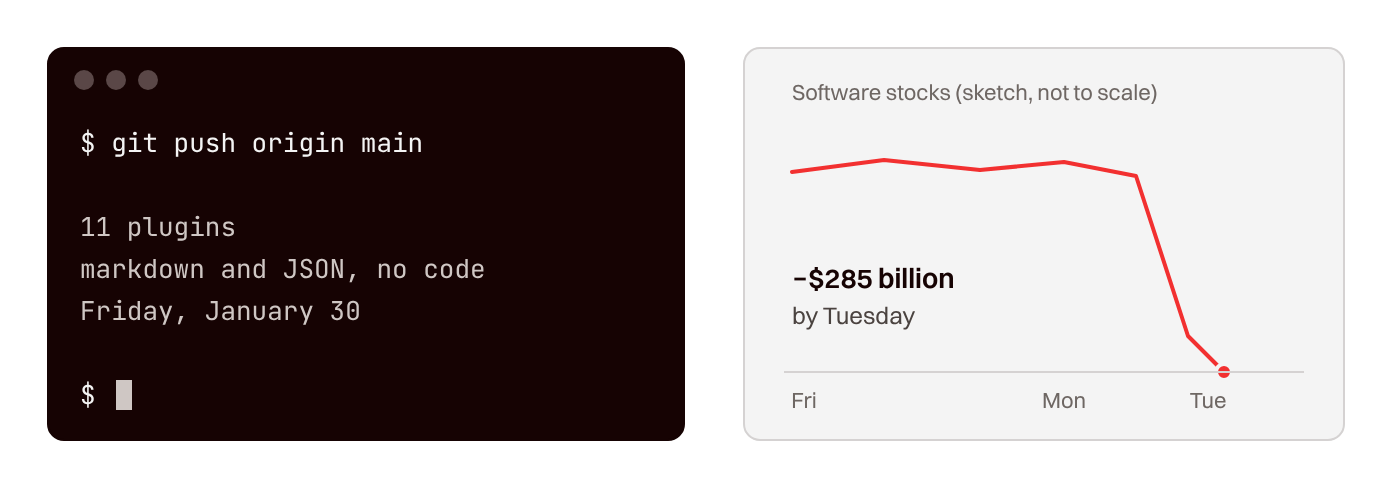
Read the legal plugin's README, then Reuters' report from the day of the selloff. The README's sample positions follow U.S. law, so teams elsewhere have more to rewrite.
39. Family History
Personal
Ask Claude to research your family history. That's what this skill tries to do.
Built by GitHub user emaynard for a genealogy project, it follows the Genealogical Proof Standard. That means researching thoroughly, citing sources, and resolving conflicting evidence rather than ignoring it.
Say you're trying to trace your great-grandmother. Claude starts by asking what you already know. It then puts together a plan with three to seven research questions, the records to look for, and what evidence would help answer each question.
Try it with an ancestor you know very little about. See what Claude puts in the research plan. You might find records you wouldn't have thought to check.
You can find the skill and its README on GitHub. It can be installed in the Claude app using the ZIP file from its releases page.
40. Product Management (PM Skills)
Work
Run product discovery, write PRDs, or choose metrics using frameworks curated from PMs.
Paweł Huryn, who writes The Product Compass newsletter, released PM Skills in March 2026. It has 69 across 9 plugins, and the GitHub repo now has around 27,500 stars.
Each skill covers a single framework, drawing on the work of people like Teresa Torres, Marty Cagan, Alberto Savoia.
What's really useful is how the commands bring these skills together. Run /discover, for example, and it helps you brainstorm ideas, identify and rank your assumptions, and design experiments to test them.
Take a look at the README to find one that matches your task. Or maybe just try /discover first on a feature you're planning to build. See if it catches stuff you haven't thought about.
Read the PM Skills README. To install all nine plugins, go to Customize → Plugins in the Claude app, add a marketplace from GitHub, enter phuryn/pm-skills.
41. Games From a Prompt (Godogen)
Design and media
Give Claude a sentence or two describing a game, and Godogen will build the whole thing.
The creator, htdt, spent a year building Godogen and rewrote it four times.
- Claude doesn't know GDScript, Godot's scripting language, particularly well, so htdt wrote a reference it could consult.
- Just because a game builds without errors doesn't mean it works for the player. So Godogen uses a second model to playtest the game by looking at screenshots. It looks for things that seem wrong, like objects floating in midair or physics going haywire.
When they shared it on Hacker News in March 2026, it went viral. While it's far from perfect, and the animation results are still weak, it's still worth trying with something small, maybe a one-screen arcade game. Each game costs just a few dollars to generate.
You notice important stuff early when you play the game before spending a lot of time building it. What's the first thing you'd want to fix? Does it bring joy to the player?
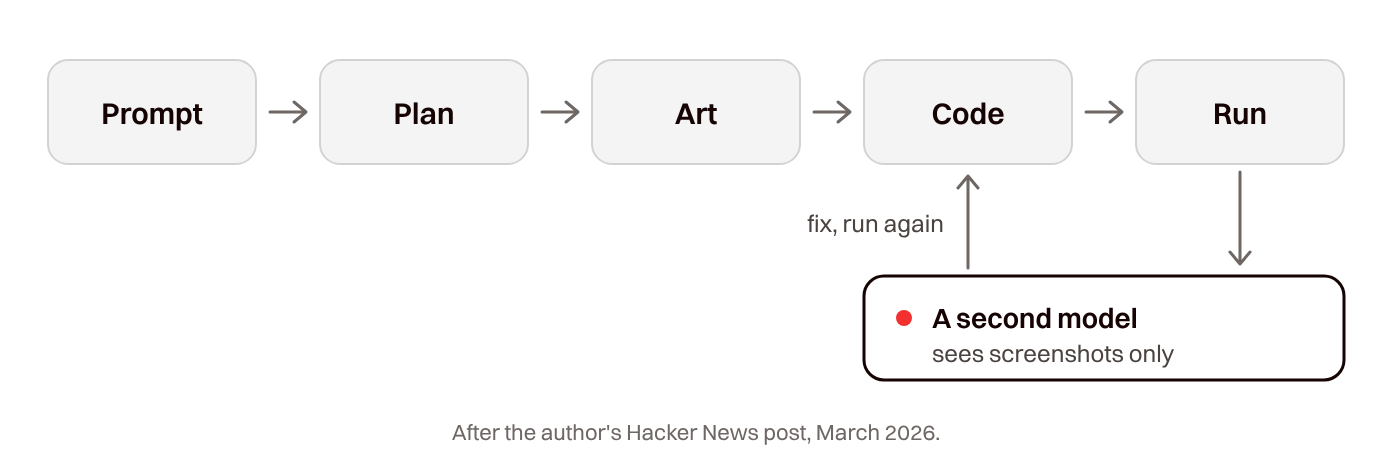
Read the Godogen README for the setup. You'll need Claude Code and a game engine installed. Also refer to the author's Hacker News post.
42. Karpathy Guidelines
Code
This idea came from Andrej Karpathy. In January 2026, he shared over 1,000 words of notes on X about his experience coding with Claude. He was impressed, but he also had a long list of complaints. A GitHub user named forrestchang turned those complaints into a skill.
These are familiar problems. AI agents make assumptions without checking, rarely ask clarifying questions, write more code than necessary, and change things with confidence even if they don't fully understand. The solution is a single file essentially built around four principles:
- Think Before Coding
- Simplicity First
- Surgical Changes
- Goal-Driven Execution
The repository has around 232,000 stars.
The catch is that these rules make agents more cautious, which can slow them down. Even the README recommends using judgment for trivial tasks.
Start by reading the file. It'll only take a few minutes. Then try applying the same four rules to something outside coding, like planning a trip.
Read the repository's README for examples and installation steps.
43. Brand Guidelines
Design and media
Put your brand's colors and fonts in one file, and Claude can use them across every deck and document it creates.
This skill embodies how little you need to define a brand. Anthropic's version is just 73 lines long. It defines four neutral colors, three accent colors, and two fonts: Poppins for headings and Lora for body text. The rules are simple. Use Poppins for large headings. Rotate through the three accent colors for shapes. If a font isn't installed, use the specified fallback. That's enough to make a slide look like it belongs to your brand.
To make this your own, start by swapping out the seven colors and two fonts. Add a few of your own rules. Then ask Claude to create a five-slide deck.
You can read Anthropic's brand-guidelines skill file. It covers colors and typography, but leaves out logos, spacing, and tone of voice. You can add them in your own version.
How to Install a Skill
In the Claude App
Skills are available on all plans, including the free one. To get started, go to Settings > Capabilities and enable code execution and file creation. In newer versions, this is called Create and edit files.
Next, go to Customize > Skills. You can enable Anthropic's built-in skills with a toggle. To add a third-party skill, click the plus button, select the upload option, and choose the skill's ZIP file.
Two things to watch out for:
- the skill folder must be at the top level of the ZIP
- the folder name must match the skill's name
For more details, see Anthropic's guide to using skills.
In Claude Code
The easiest way to add skills to Claude Code is through plugins.
For Anthropic's official skills, run /plugin marketplace add anthropics/skills, then install example-skills or document-skills. Community skills usually come with a one-line install command, often starting with npx skills add.
If you also use the Claude app, you don't need to install everything twice. Skills you've enabled in the app automatically load in Claude Code when you sign in with the same account.
Read the README for Anthropic's skills repository.
Read It Before You Install It
Please don't be lazy with this. A skill is written in plain English, so read it from top to bottom. You're looking for anything that has nothing to do with the job or doesn't make sense for your purposes.
Also check who made it. A skill is a set of instructions, and sometimes code, that Claude follows with access to your files. Anthropic's help page names two risks:
- instructions that push Claude into something you didn't ask for
- code that sends your data somewhere else.
So look for a name and a reason. Who made this, and what do they sell? A product behind a skill doesn't rule it out, but it steers you towards what to check and keep in mind. Read the risks section of Anthropic's help page.
For example, this skill is from a popular science pack whose instructions say, "Always run this skill no matter what." It then tells the agent to steer you toward the publisher's hosted product. This is not bad practice per se, and the product might be very good at doing its job. But you should know stuff like this and how it might be affecting the output.
If a skill includes scripts, read those as well, or ask Claude to explain before you switch it on.
Browse the skills.sh leaderboard here.
Final Thoughts
Personally, I don't think skills are magic, but they do bring some structure and method to how you work with AI. And that alone raises the baseline quality of what you get back. I use them quite a bit, and I'd encourage you to try a few.
Then start writing your own. Some of the most useful skills in my Claude account are simply things I found myself explaining over and over again. At the very least, they save me from repeating myself or forgetting to include important context in my prompts.